
Customer Service Chatbot AI: What Works in B2B
Jan 8, 2026
B2B customer service has a different job than B2C support. Your customers are repeat buyers, they have negotiated terms, they expect precise answers, and a “wrong” response can mean lost margin, compliance risk, or a truck roll that never should have happened.
That’s why customer service chatbot AI works in B2B only when it’s designed as an operational system, not a website widget.
Below is what actually works in B2B, what routinely fails, and how to implement a chatbot that reduces workload while protecting accuracy and customer trust.
Why most B2B customer service chatbots fail
Most failed chatbot projects share the same root cause: they try to “chat” their way out of operational complexity.
Common failure patterns include:
FAQ-only bots in a non-FAQ world. B2B questions are rarely generic. They’re about “my order,” “my contract,” “my price,” “my site,” or “my SLA.”
No real system access. If the bot cannot check order status, stock, delivery windows, service history, or contract terms, it ends up guessing or escalating everything.
Untrusted answers. When customers see one hallucinated policy, they stop using the bot. Accuracy is the product.
No handoff discipline. Bots that do not collect the right metadata (order number, site address, serial number, urgency, photos) waste time for both customers and agents.
No ownership and no iteration cadence. In B2B, product catalogs change, policies change, and edge cases pile up. A “set and forget” chatbot drifts fast.
A B2B chatbot succeeds when it reliably does one of these jobs:
Resolves a defined set of requests end-to-end.
Performs high-quality intake and routing so humans start with context.
Assists agents behind the scenes to respond faster and more consistently.
What works in B2B: 7 patterns that drive real ROI
These patterns show up again and again in wholesalers, distributors, B2B suppliers, professional services, installation companies, and B2B real estate.
1) Structured intake first, conversation second
The biggest win is often not “answering,” it’s capturing clean input.
A good B2B chatbot behaves like a great dispatcher:
It clarifies the request type (delivery, invoice, technical issue, return, contract question, quote).
It collects identifiers (account, order, PO, location, serial number).
It captures urgency and impact (production down, safety issue, deadline today).
It gathers evidence (photos, screenshots, error codes).
This turns messy inbound messages into actionable tickets, and it prevents back-and-forth.
Where it shines by sector:
Wholesale/distribution: “Where is my shipment?”, “Can I change delivery?”, “Return authorization.”
Installation/field service: “System down” triage, site access info, fault codes, warranty checks.
Accountancy/legal boutiques: onboarding intake, document requests, deadline triage (with careful compliance guardrails).
2) Account-aware self-service (authentication matters)
B2B customers do not just want answers, they want their answers.
A chatbot becomes genuinely useful when it can operate in an authenticated context, for example:
Show order status and delivery ETAs
Retrieve invoices or statements
Check contract start/end dates or SLA tiers
Confirm whether a part is covered under warranty
Pull asset history for a specific site
This is also where you reduce risk, because the bot stops “speaking generally” and starts “reading from records.”
3) Knowledge-grounded answers (RAG, not guessing)
If your chatbot relies only on a general-purpose model and a prompt, it will eventually invent something.
In B2B, what works is grounding the chatbot in your approved sources, typically via retrieval-augmented generation (RAG): the bot retrieves relevant passages from your knowledge base (policies, manuals, internal runbooks, product sheets) and answers with that context.
Best practices that actually move the needle:
Use a curated knowledge set (not “all files in SharePoint”).
Require citations internally (even if you don’t show them to customers).
Separate public policies from account-specific terms.
Put an explicit “I don’t know” and escalation path in place.
For an evidence-based approach to AI risk and reliability, the NIST AI Risk Management Framework is a solid reference for building controls that match real operational risk.
4) Quote and “pre-sales service” flows with hard guardrails
In many B2B companies, customer service is tied to revenue: customers ask service teams for compatibility checks, alternatives, lead times, or pricing guidance.
What works:
The bot gathers requirements (application, dimensions, capacity, site constraints).
It checks stock and lead time (via ERP or inventory system).
It proposes the next action (create a quote request, schedule a call, route to technical sales).
What does not work:
Letting the bot freely propose pricing, discounts, or contract terms without strict rules and approvals.
A good pattern is: the bot drafts and pre-fills, humans approve when money or liability is involved.
5) Agent-assist mode (often the fastest ROI)
If your customer-facing chatbot feels risky, start behind the scenes.
Agent-assist uses the same AI capability, but it supports your team instead of replacing them:
Summarize long email threads and call transcripts
Suggest the next-best reply using your policy and product knowledge
Extract key fields into the ticket (order number, product, urgency)
Generate internal checklists or troubleshooting steps
In professional services (accountancy, legal), agent-assist is often the practical starting point because it improves speed without exposing the model directly to customers.
6) “Do the work” automation, not just “answering”
The best B2B chatbots are connected to workflows.
Examples:
Create an RMA request, collect photos, route to the right approver
Trigger a replacement shipment workflow after validation
Update CRM notes after a support interaction
Open a service job with the correct site details
This is where chatbots stop being a support channel and become a productivity layer.
7) Proactive service updates that reduce inbound volume
A large portion of inbound tickets is “Where is X?” or “What’s the status?”
If your chatbot AI can send proactive updates (order shipped, technician delayed, part backordered, invoice overdue with payment link), you reduce inbound demand entirely.
This requires integration and disciplined event triggers, but it tends to be one of the cleanest ROI cases in B2B.
The non-negotiables: design principles for B2B chatbot AI
A B2B chatbot should feel less like small talk and more like a reliable operator.
Keep it fast and explicit
B2B users are usually mid-task. They want resolution, not personality.
Provide clear options (“Track delivery”, “Request return”, “Technical issue”, “Invoice question”).
Confirm critical details before taking actions.
Avoid long paragraphs, use short prompts and quick confirmations.
Ask for the minimum that unlocks the next step
A common mistake is forcing a long form early. Instead:
Ask one question at a time.
Use progressive disclosure (only ask for serial number when it’s a warranty case).
Save partial progress so the customer can continue later.
Design the handoff as a product
Escalation is not failure. In B2B, it’s normal.
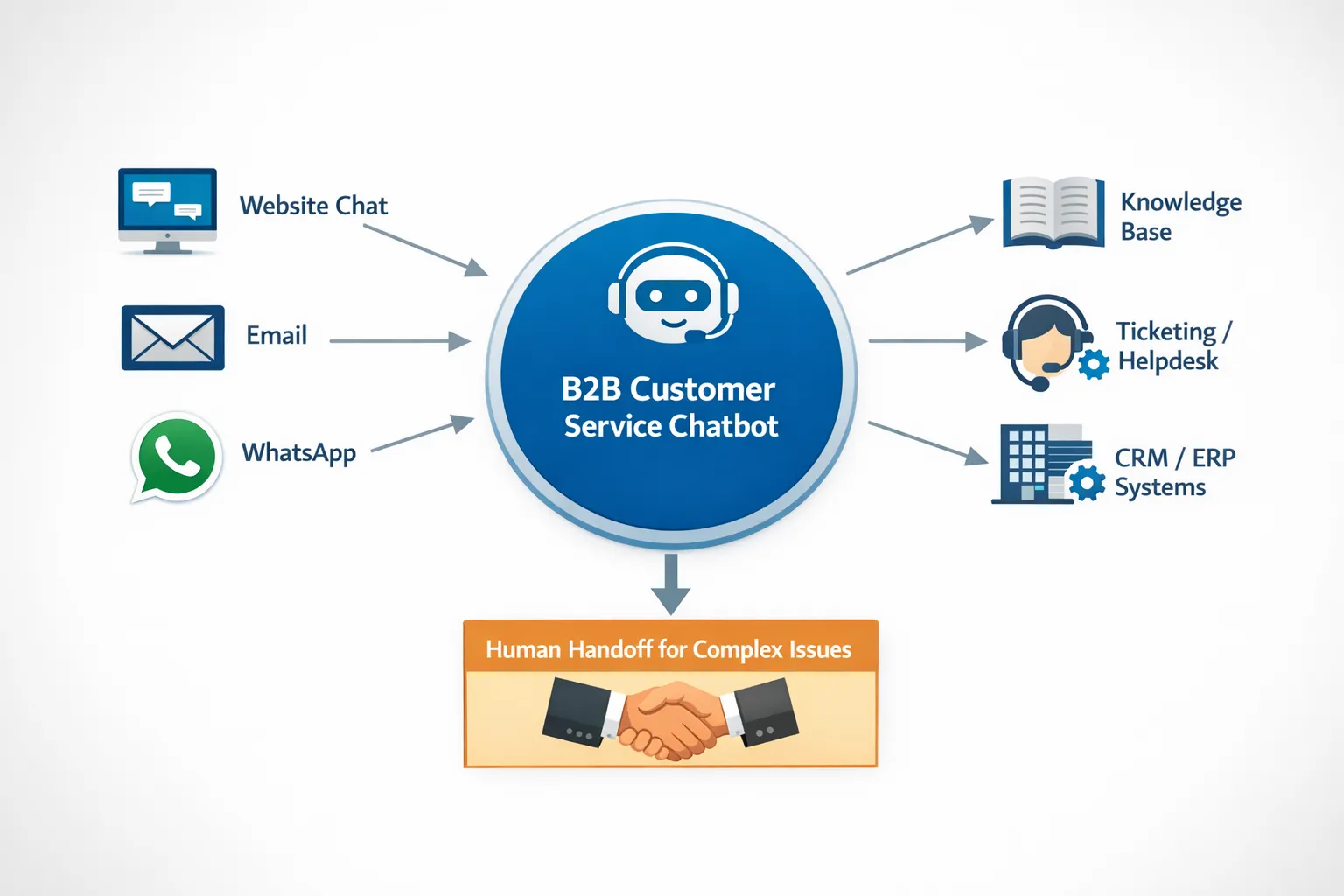
A strong handoff includes:
A structured summary of what the customer asked
The extracted identifiers (account, order, site)
Attachments and evidence
A suggested category and priority
This prevents “please repeat your issue” loops, which destroy trust.
Data and integrations: what your chatbot must connect to
You do not need every system on day one, but you should plan for a stack that supports account-specific reality.
Common integration points in B2B include:
Helpdesk/ticketing for case creation, routing, and SLA tracking
CRM for account context, contacts, and commercial history
ERP/WMS for orders, delivery status, invoices, stock, returns
Knowledge base for grounded answers (policies, manuals, internal playbooks)
Communication channels like email and WhatsApp (common in distribution and field service)
If you’re building or scaling workflow automation across sales and operations, it helps to think beyond “the bot” and into end-to-end orchestration. (Related: How AI is transforming workflow automation for businesses.)
Governance in 2026: accuracy, privacy, and the EU AI Act
In B2B, a chatbot is part of your operating model, so governance is not optional.
Privacy and data minimization
Only collect what you need to resolve the issue.
Mask or restrict sensitive fields when they are not required.
Separate public knowledge from customer-specific records.
For regulatory context and updates, see the European Commission’s overview of the EU regulatory framework for AI.
Security and access control
Use role-based access for internal agent-assist.
Ensure authenticated customer flows cannot leak data across accounts.
Log access and actions taken (especially if the chatbot can trigger workflows).
Reliability controls (what prevents brand damage)
Define “high-risk intents” (pricing, legal terms, liability, safety). Force escalation or human approval.
Maintain a reviewed source of truth for policies and technical documentation.
Monitor for drift: new products, new exceptions, changing terms.
(General industry research like the Salesforce State of Service report is also useful for understanding how customer expectations and service operations are changing, even if your execution needs to be tailored for B2B complexity.)
KPIs that matter for B2B chatbots (beyond vanity metrics)
Do not judge a customer service chatbot AI project by “number of conversations.” In B2B, quality and operational impact matter.
Track a small set that reflects both efficiency and trust:
Containment rate (with quality): percentage of conversations resolved without a human, measured only when the outcome is correct.
Time to first meaningful response: not just “bot replied,” but “customer got a useful step.”
Time to resolution: especially for triaged tickets where the bot collected complete information.
Reopen rate / correction rate: how often humans must fix what the bot did or said.
Escalation quality: whether escalated tickets arrive with the required fields filled.
CSAT/NPS impact for service interactions: use trendlines, not one-off survey spikes.
If you cannot measure at least containment quality and resolution speed, you will struggle to improve the system.
A pragmatic rollout plan that works in B2B
You do not need a big-bang launch. You need a controlled release that improves weekly.
Start with 3 high-volume intents
Pick the requests that are repetitive, data-backed, and low-risk. Typical winners:
Order status and delivery updates
Returns/RMA intake
Invoice and statement requests
Build a “safe answer layer”
Before the bot talks to customers, decide:
Which sources it can use
Which topics require escalation
Which answers must be copied from approved policy text
Launch with clear human-in-the-loop rules
Route edge cases to humans fast
Show the user what will happen next (ticket created, expected response window)
Give agents the bot’s summary and extracted fields
Iterate weekly based on real conversations
Your first month should be about:
Updating knowledge gaps
Improving intent recognition
Reducing unnecessary escalations
Tightening guardrails where accuracy is fragile
Buy vs build for B2B chatbots
A quick rule: buy when your workflows are standard, build (or customize) when your differentiation is in process.
Buying a platform tends to work when:
You mainly need omnichannel chat, a basic knowledge base, and helpdesk workflows.
Your questions are mostly policy and status updates.
Custom build or customization tends to win when:
You need deep ERP/CRM integration, account-aware responses, and complex routing.
You want the chatbot to trigger operational workflows (RMA, job scheduling, quote copilots).
You need strict governance, logging, and tailored guardrails.
Where B2B GrowthMachine fits
If your goal is not just “add a chatbot,” but reduce service workload and improve response quality through automation, you need the bot connected to the systems where work happens.
B2B GrowthMachine helps SMEs implement AI-driven automation across sales and operations, including customer service workflows, integrations with existing tools (CRM, ERP, email, WhatsApp, Slack, and APIs), and ongoing optimization.
If you want to explore a practical, low-risk starting point (for example, structured intake plus agent-assist, or order-status automation tied into your back office), start with a focused scope and build from there.
Learn more at B2B GrowthMachine.