
AI Data: Clean, Enrich, Activate in One Flow
Jan 24, 2026
Most AI projects fail for a boring reason: the data is not operational. It lives in scattered spreadsheets, half-filled CRM fields, email inboxes, ERP exports, and “someone’s knowledge.” You can build great prompts and even impressive agents, but if your AI data is messy, incomplete, or not connected to actions, you end up with unreliable outputs and more manual work.
A better goal for SMEs is simpler and more powerful: AI data that can be cleaned, enriched, and activated in one flow. Not a six-month data warehouse project, not a stack of disconnected tools, but a practical, production-ready loop that turns signals into outcomes.
What “AI data” means in 2026 (and why “analysis” is not enough)
In many SMEs, “data work” still means exporting CSVs, fixing errors, and building reports that tell you what happened last month. Useful, but not decisive.
In operational AI, the bar is higher. AI data should be:
Trusted enough to drive actions (or at least recommendations) repeatedly.
Fresh enough to match how sales and operations run today.
Complete enough to make decisions without asking humans for missing context every time.
Connected to the systems where work happens (CRM, ERP, inbox, ticketing, Slack/Teams).
The moment you connect AI to quoting, follow-up, lead routing, credit checks, dispatching, or compliance triage, your data stops being “reporting input” and becomes production fuel.
The one-flow model: Clean → Enrich → Activate → Learn
The core idea is to stop treating cleansing, enrichment, and activation as separate initiatives owned by different people.
Instead, build one operational flow that:
Cleans incoming records so your systems stay consistent.
Enriches them with the context needed to make a decision.
Activates that decision into real actions (messages, tasks, updates, alerts).
Learns from outcomes so the next decision is better.
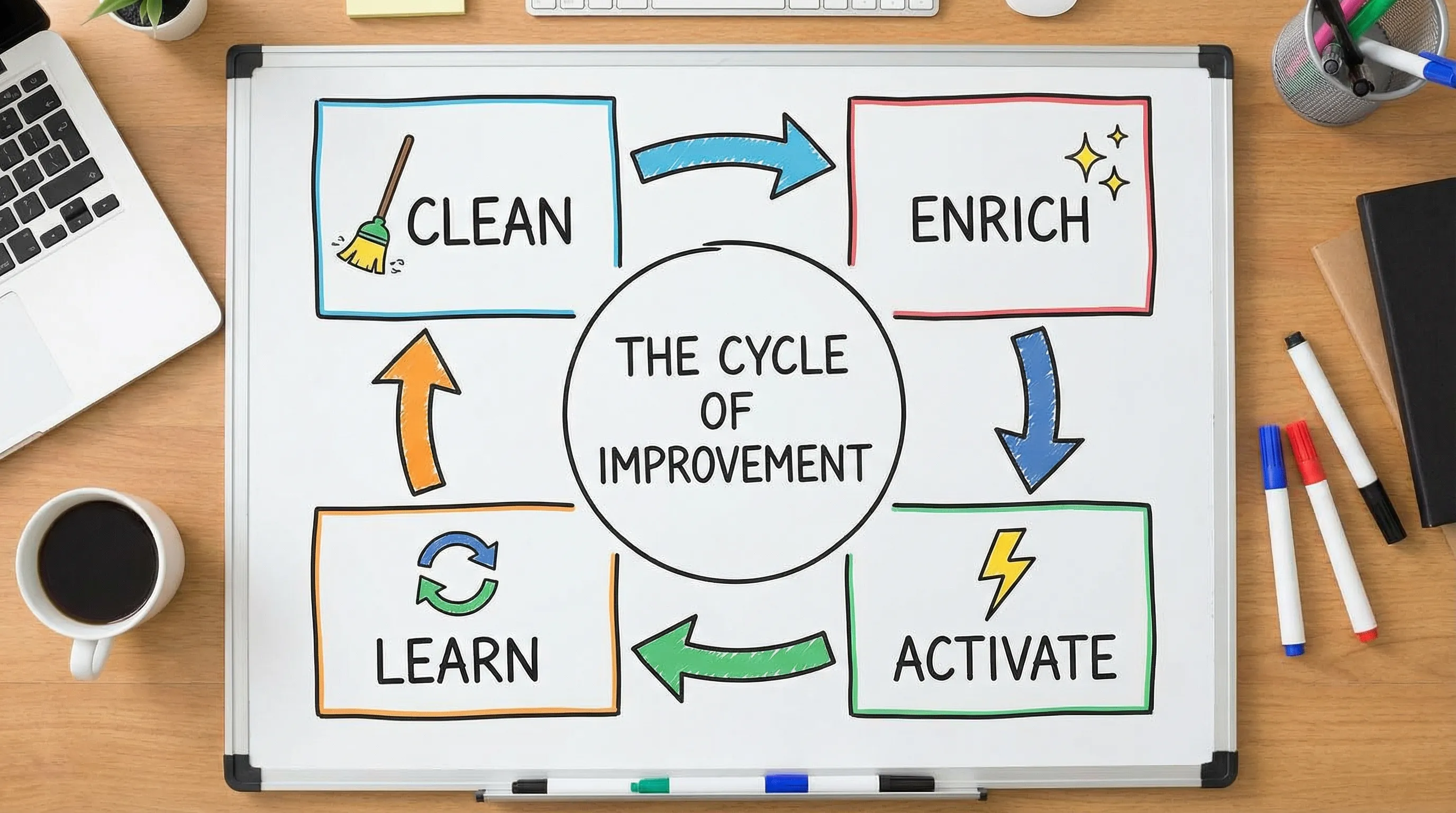
This loop is how you make AI useful for wholesalers, distributors, installation companies, accountancy firms, and B2B brokers, because these businesses win on speed, accuracy, and follow-through.
Step 1: Clean (make the data safe to automate)
“Cleaning” is not just removing duplicates. In operational workflows, cleaning means creating reliable inputs for downstream decisions.
What to clean first (the 80/20)
Focus on fields that directly impact revenue, risk, or cycle time:
Identity and routing: company name, domain, VAT/tax ID, location, account owner
Contactability: email validity, phone format, opt-out status
Commercial logic: price list, margin tier, contract terms, lead time class
Workflow status: lifecycle stage, next step, SLA timers, last touch
For most SMEs, cleaning the entire CRM is unnecessary. Clean the records that enter your highest-frequency workflows.
A practical “data contract” mindset
To keep the system clean, define rules for what “good” looks like at the point of entry:
Required fields for a lead to be routed
Allowed formats (country codes, date formats, VAT structure)
Deduplication rules (domain match, VAT match, fuzzy name match)
Who is allowed to overwrite what (especially for master data)
This is also where you reduce compliance risk. If personal data appears in free-text fields, it becomes harder to manage under privacy rules.
For GDPR basics, use the official EU overview as a reference: GDPR portal.
Step 2: Enrich (add the context your team normally looks up manually)
Enrichment is where AI data becomes decision-ready. In B2B, a “lead” is rarely just a name and email. Your team needs context to decide:
Is this account a fit?
Is there intent?
What should we say?
What offer or pricing rules apply?
Is there delivery capacity or credit risk?
Enrichment sources that work well for SMEs
You typically combine:
Internal context: purchase history, open quotes, support tickets, payment behavior, installed base
Firmographic context: industry, size, location, branch count
Behavioral context: email engagement, website signals, reply patterns, inbound request type
Operational context: stock exceptions, lead times, technician availability
AI can help normalize messy text (for example, mapping a free-text “industry” field into a controlled list), and it can extract entities from inbound emails or PDFs (for example, product codes, quantities, delivery address).
Enrichment must be “bounded”
A common failure mode is enrichment that produces confident but unverifiable claims. The fix is to treat enrichment as two categories:
Verified enrichment: values you can trace to a source (internal systems, authoritative registries, trusted vendors)
Heuristic enrichment: predictions or classifications (lead score, churn risk, topic tags)
Heuristic enrichment is fine, but it must be labeled and monitored. If you are deploying AI in regulated or higher-risk contexts, align your governance with frameworks like the NIST AI Risk Management Framework.
Step 3: Activate (turn improved data into actions that move KPIs)
Clean and enriched data is only valuable when it changes what happens next.
Activation means your AI data flow produces structured outputs that trigger work in the right system, with the right owner, at the right time.
Activation patterns that consistently pay off
Speed-to-lead routing
When a lead comes in, the workflow can:
Validate contactability
Enrich company profile
Assign owner based on territory, segment, capacity
Create CRM tasks and send a first response within minutes
Quote acceleration
When an inbound request arrives (email, form, WhatsApp), the workflow can:
Extract product lines and quantities
Match to ERP product codes
Apply pricing rules or route to the right price list
Draft the quote response and log everything to CRM
Exception-driven operations
When something breaks (late shipment risk, stockout, invoice mismatch), the workflow can:
Detect the exception
Enrich with context (customer priority, SLA, margin impact)
Recommend a next-best action
Notify a human with a short evidence pack
Guardrails are part of activation, not a separate project
If activation can write into CRM/ERP, you need basic controls:
Human-in-the-loop for high-impact steps (pricing changes, credit decisions, contract terms)
Idempotency (avoid double-creating deals or tasks)
Audit logs (what happened, why, using which inputs)
Fallback behavior (what the system does when confidence is low)
This is also where the upcoming compliance landscape matters. If you operate in the EU, get familiar with the direction of travel of the EU AI Act, especially around risk classification, documentation, and oversight.
Step 4: Learn (close the loop so the system improves)
Without feedback, your AI data flow slowly drifts.
The learning loop does not need to be complex machine learning. In many SMEs, it starts with disciplined instrumentation:
Did the lead reply?
Did the quote convert?
Was the classification correct?
Did the “recommended next step” get accepted?
How often did humans override the AI?
The key is to store these outcomes back into your systems so enrichment and activation become smarter over time.
What this looks like in real SME industries
Here are practical examples of “clean, enrich, activate” that match how your business actually runs.
Wholesale and distribution
Clean: deduplicate accounts by VAT and domain, normalize shipping addresses
Enrich: attach contract price list, fill-rate history, lead-time class, substitution rules
Activate: trigger proactive backorder updates, route high-margin exceptions to senior reps, accelerate replenishment decisions
Installation and field service companies (B2B)
Clean: standardize site addresses, asset IDs, maintenance contract status
Enrich: match inbound requests to installed base, technician skill tags, SLA tier
Activate: auto-triage requests, propose appointment slots, escalate safety-critical signals
Accountancy and legal boutiques
Clean: client identifiers, engagement types, document naming conventions
Enrich: extract entities from documents, tag request types, flag missing KYC fields
Activate: route work to the right specialist, generate checklists, create audit-ready logs
B2B real estate brokers
Clean: unify company records, decision-maker roles, property identifiers
Enrich: match accounts to portfolio fit, detect intent signals, pull comparable context
Activate: generate tailored outreach tasks, prioritize accounts with active demand, reduce response time on inbound requests
A pragmatic 30-day way to implement “one flow”
Most teams fail because they start with tooling. Start with a single operational decision and build around it.
Week 1: Pick one decision and one workflow
Examples:
“Which inbound leads should get a response within 10 minutes, and what should we say?”
“Which quote requests can we draft automatically, and which require human review?”
“Which accounts need follow-up this week, and why?”
Define success in business terms (cycle time, conversion, hours recovered).
Week 2: Build the cleaning gate
Implement validation, formatting rules, and deduplication at the point where data enters the workflow. Keep it narrow.
Week 3: Add the enrichment needed to decide
Only enrich what the workflow needs. If a field does not change the decision, do not add it.
Week 4: Activate with guardrails and measurement
Push actions into the systems your team already uses. Add human approval where risk is real. Instrument outcomes.
At the end of 30 days, you should have one flow that reliably produces business impact, not a “data project.”

The KPIs that prove your AI data flow is working
If you measure only “records cleaned” or “fields enriched,” you will optimize activity, not outcomes. Operational AI data should move metrics like:
Hours recovered per week (manual enrichment, copy-paste, chasing missing info)
Cycle time (lead response time, quote turnaround, ticket resolution)
Error rate reduction (duplicate accounts, wrong routing, incorrect pricing fields)
Conversion lift (reply rates, meeting booked rate, quote-to-order)
Cost-to-serve reduction (tickets per order, touches per quote, rework)
These KPIs also make governance easier, because you can justify what the automation does and why it exists.
Where B2B GrowthMachine fits
If you want AI data that does more than produce dashboards, you need a system that connects cleaning, enrichment, and activation into workflows that your team can run every day.
B2B GrowthMachine focuses on AI-powered sales and operations automation for SMEs, using workflows and agents that integrate with your existing tools (CRM, ERP, email, WhatsApp, Slack, and APIs). The goal is not “more AI,” it is fewer manual tasks, faster cycles, and repeatable growth.
To explore a practical pilot that turns your current CRM/ERP data into an operational flow, start at B2B GrowthMachine and map one workflow end-to-end before expanding.