
Its AI: How to Explain AI to Your Team
Jan 23, 2026
Most AI rollouts fail for one boring reason: people don’t share the same definition of “AI,” so expectations, fears, and responsibilities get mixed up.
If you’ve ever heard, “So… it’s like ChatGPT?” or “Is this replacing my job?” or “Are we allowed to put customer data in there?” you’re not dealing with a tech problem. You’re dealing with a shared-language problem.
This guide gives you a practical way to explain AI to your team (without hype), align on what it can and cannot do, and set simple rules so you can start safely.
Start with the two truths that calm everyone down
When you explain AI internally, lead with two statements that are both true and easy to remember:
AI is not a source of truth. It’s a prediction engine that generates outputs based on patterns in data.
AI is most valuable when it sits inside a workflow. The real gains come from reducing cycle time, errors, and repetitive work, not from “cool outputs.”
That framing immediately reduces two common failure modes:
People over-trusting AI (and shipping confident mistakes).
People dismissing AI as “just another tool” with no measurable value.
If you want a credible, risk-aware reference point, you can borrow language from the NIST AI Risk Management Framework, which stresses governance and trustworthiness, not just performance.
The simplest explanation of AI (use this verbatim)
If you need a one-minute explanation that works across departments:
“AI is software that turns messy inputs (text, emails, documents, CRM notes) into useful outputs (summaries, drafts, classifications, recommendations). It’s fast and helpful, but it can be wrong, so we use it with guardrails and human approval when needed. Our goal is not to ‘use AI everywhere.’ Our goal is to remove repetitive work and speed up decisions in a few high-impact workflows.”
That’s the baseline. Now you can go one level deeper.
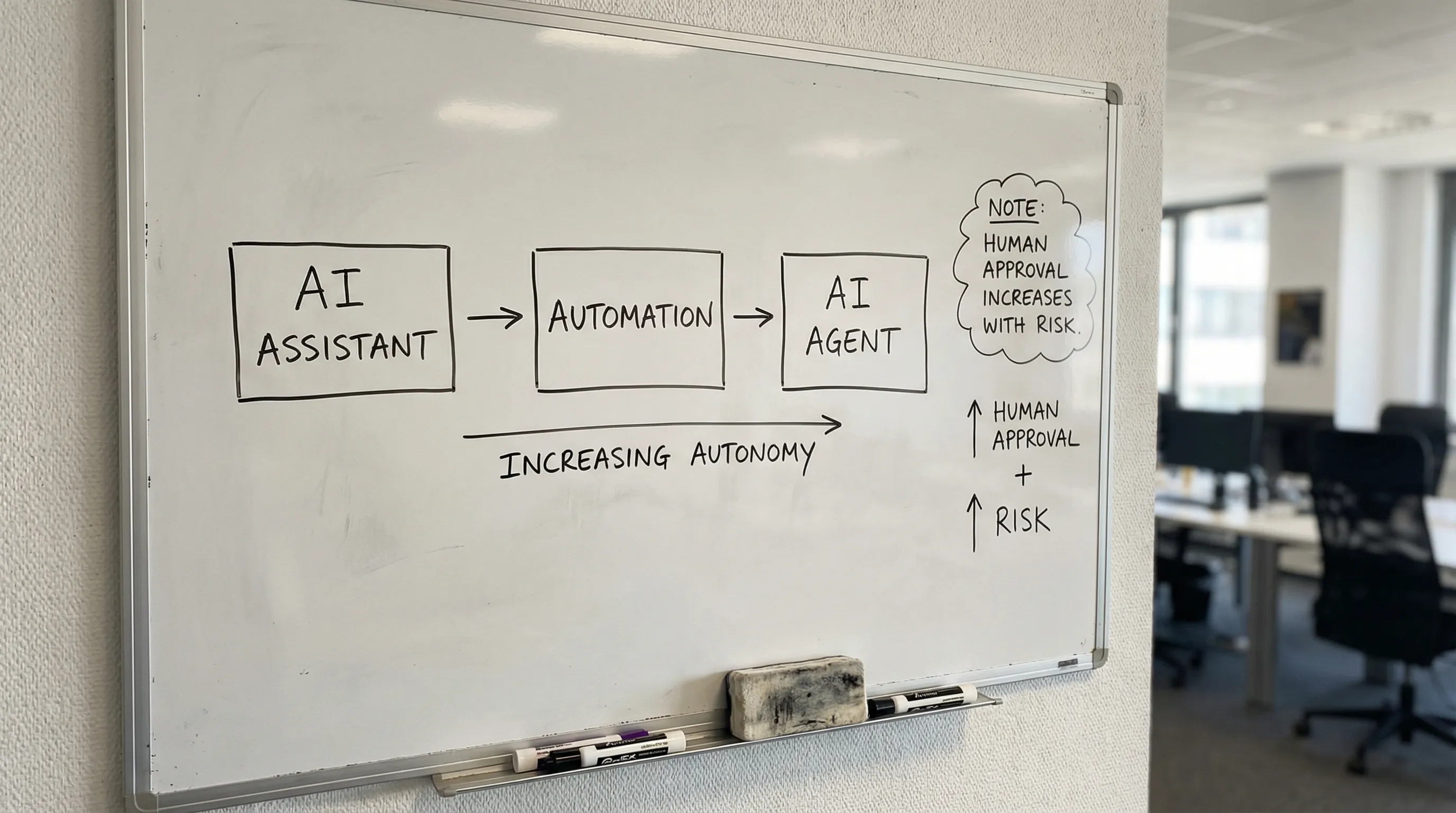
Explain AI using three buckets your team can remember
Non-technical teams don’t need model details. They need to understand how AI shows up in daily work.
Use these three buckets:
1) AI assistant (helps a person)
An AI assistant supports someone doing a task: drafting, summarizing, searching, translating, structuring.
Examples:
Summarize a customer email thread and propose a reply.
Turn meeting notes into CRM-ready updates.
Draft a first quote or proposal outline using your templates.
2) Automation (moves work through steps)
Automation is a workflow that triggers actions: routing, creating tasks, updating systems, sending messages.
Examples:
When a lead replies, tag intent, assign owner, create a follow-up task.
When a quote request arrives, gather missing details, create a draft quote, notify sales.
3) AI agent (handles a goal with supervision)
An agent is closer to “delegation.” It can plan steps and do multi-action work, but it needs clear boundaries.
Examples:
Monitor inbound RFQs, request missing specs, assemble a draft, route for approval.
Identify stalled deals and propose next-best actions based on playbooks.
This matters because many teams try to jump straight to “agents” before they have the foundations. If your team wants the broader roadmap, your internal doc can link to your longer implementation resources later, but in the kickoff meeting you want this simple mental model.
Address the three questions everyone is thinking (but may not say)
If you don’t name these explicitly, they will silently block adoption.
“Is AI replacing my job?”
A credible answer for SMEs:
AI replaces tasks, not roles. It’s best at repetitive, high-volume work.
Your goal is capacity (more done with the same team) and quality (fewer errors), not layoffs.
New responsibilities show up: better customer conversations, better exception handling, better decisions.
If you say this, you must act like it. If leadership uses AI as a headcount threat, people will resist, hide mistakes, and avoid using the tools.
“Can I trust the output?”
Also be direct:
AI can hallucinate, omit context, and sound confident.
Therefore we define where AI is allowed to act, and where humans must approve.
A practical rule of thumb:
Drafting and summarizing is low risk.
Decisions and customer-facing commitments require review and logging.
If your organization needs a structured approach, consider adopting an “AI check” habit before production workflows. (B2B GrowthMachine has a full checklist-style approach in its resources, but the principle is simple: measure quality, control risk, monitor outputs.)
“Are we allowed to put data into AI?”
This is where you earn trust.
You don’t need to turn the kickoff into a legal training, but you do need clear boundaries:
What tools are approved.
What data is forbidden.
What happens when someone is unsure.
For EU-based teams, anchor your internal policy to GDPR obligations and vendor agreements. For regulatory context, see the EU AI Act overview.
Make it real: examples that match B2B SME work
Your target audiences (wholesale, distributors, B2B suppliers, accountancy/legal boutiques, installers, B2B real estate) share a reality: lots of inbound requests, lots of exceptions, and too much manual follow-up.
Use examples that feel familiar.
Sales and account management
AI is easiest to explain here because the pain is visible.
Speed-to-lead: AI drafts a first response, asks for missing details, and schedules next steps.
CRM hygiene: AI turns emails and meeting notes into structured CRM updates.
Quote support: AI prepares a quote draft from templates and known product rules, then a human approves.
Operations and service teams
Operations teams often think AI is “marketing fluff.” Don’t pitch creativity. Pitch reliability.
Intake triage: classify requests (order status, returns, technical question), route to the right queue.
Exception handling: detect missing information, request it, and prevent back-and-forth.
Planning support: summarize job details, constraints, and next actions for dispatch.
Finance and admin
Finance teams care about control.
Document intake: extract and validate fields from invoices or purchase orders.
Collections support: draft polite follow-ups based on rules and status.
Month-end assistance: reconcile, summarize anomalies, prepare narratives for management.
The key message across departments is the same: AI turns unstructured work into structured actions, faster and with fewer mistakes, but we keep humans in the loop where risk is high.
Give your team a shared vocabulary (so you stop arguing about “AI”)
A lot of internal confusion comes from sloppy words.
Use these replacements:
Say “draft” instead of “write.”
Say “recommend” instead of “decide.”
Say “summarize and cite sources” instead of “research.”
Say “execute a workflow” instead of “automate everything.”
And introduce one sentence that should appear in every AI-enabled SOP:
“If the output impacts money, compliance, or customer commitments, a human approves.”
It’s simple, it scales, and it prevents most disasters.
Run a 45-minute “It’s AI” kickoff meeting (agenda + script)
You can run this meeting with a mixed group (sales, ops, finance). Keep it operational.
What to cover
5 minutes: Why now (capacity constraints, response speed, fewer errors).
10 minutes: The three buckets (assistant, automation, agent) and what you are actually building.
10 minutes: Two demos (one success, one failure). Show that AI can be wrong.
10 minutes: Guardrails (approved tools, data rules, human approval points).
10 minutes: First pilot workflow and what success looks like.
The pilot definition (keep it measurable)
Define success as one or two metrics, not “we used AI.” For example:
Reduce time-to-first-response.
Reduce quote turnaround time.
Recover hours per week in a specific team.
Reduce rework caused by missing information.
If you want a deeper measurement approach, align with workflow-first ROI thinking (hours recovered, cycle time, error reduction). The principle is: baseline first, automate second.
Set lightweight rules that prevent 90% of AI chaos
You don’t need a 30-page policy. You need a one-page “how we use AI here.”
Include:
Approved tools list: what’s allowed for work.
Data handling rules: what never goes in (sensitive personal data, credentials, contract secrets, etc.).
Human approval rules: when AI can draft vs when it can send or update systems.
Escalation path: who to ask when unsure.
Quality loop: how feedback is captured when AI output is wrong.
If your workflows touch CRM and ERP, treat integration as a safety topic, not just an IT topic. (A wrong automated update can be more expensive than a wrong email draft.)
How to answer “What should we automate first?”
To keep this article focused, here is the decision filter you can use in conversation:
Pick a workflow that is:
Frequent (happens daily)
Painful (steals hours or delays revenue)
Bounded (clear inputs and a clear “done” state)
Low risk (easy to review, reversible actions)
Measurable (you can baseline it)
For most B2B SMEs, that often points to intake, follow-up, quoting support, and CRM updates.
Common mistakes when explaining AI internally
Overselling autonomy
If you promise “AI will run sales,” your team will either panic or tune out. Promise a smaller, believable win.
Treating AI like a single tool
AI is a capability. Value appears when it connects to your workflows and systems.
Ignoring ownership
If nobody owns the workflow (inputs, rules, quality), it will degrade quickly.
If you want to formalize ownership later, you can, but in the first phase it’s enough to name one workflow owner and one technical owner.
Frequently Asked Questions
What’s the best way to explain AI to non-technical employees? Use a workflow-based definition: AI turns messy inputs (emails, documents, notes) into useful outputs (drafts, summaries, classifications), and humans approve anything high-risk.
Is “Its AI” the same as ChatGPT? Not necessarily. ChatGPT is one AI product. “Its AI” in a business context should mean AI embedded into your processes (intake, routing, follow-up, CRM/ERP updates) with controls.
How do we prevent AI from making confident mistakes? Define approval points, ground answers in trusted sources where possible, log outputs, and review failures weekly so the workflow improves.
Can we use AI with customer and supplier data? Often yes, but only with approved tools, proper vendor agreements, and clear rules for what data is allowed. When in doubt, treat it as a privacy and risk question, not a productivity hack.
What’s a realistic first AI pilot for a B2B SME? A small, measurable workflow like inbound triage, drafting first responses, quote drafting support, or meeting-to-CRM updates, with humans approving outputs.
Want help turning “AI talk” into a working system?
Explaining AI is step one. Step two is building a workflow that actually saves time and improves outcomes, integrated into your tools, with guardrails and continuous optimization.
B2B GrowthMachine helps SMEs implement AI-driven sales and operations automation (from assistants to workflows to controlled agents), connect it to systems like CRM/ERP/email, and keep it reliable over time.
Visit B2B GrowthMachine to explore a practical pilot or discuss which workflow will deliver the fastest, safest ROI.