
AI for data: faster insights, less manual work
Dec 5, 2025
Many SMBs are drowning every day in exports from ERP and CRM, scattered Excel files, and reports that are always slightly out of date. Meanwhile, decisions get delayed because someone still has to clean, merge, and interpret the data first. AI for data changes that. With smart automation, you get reliable insights faster, while the manual work disappears.
What do we mean by AI for data?
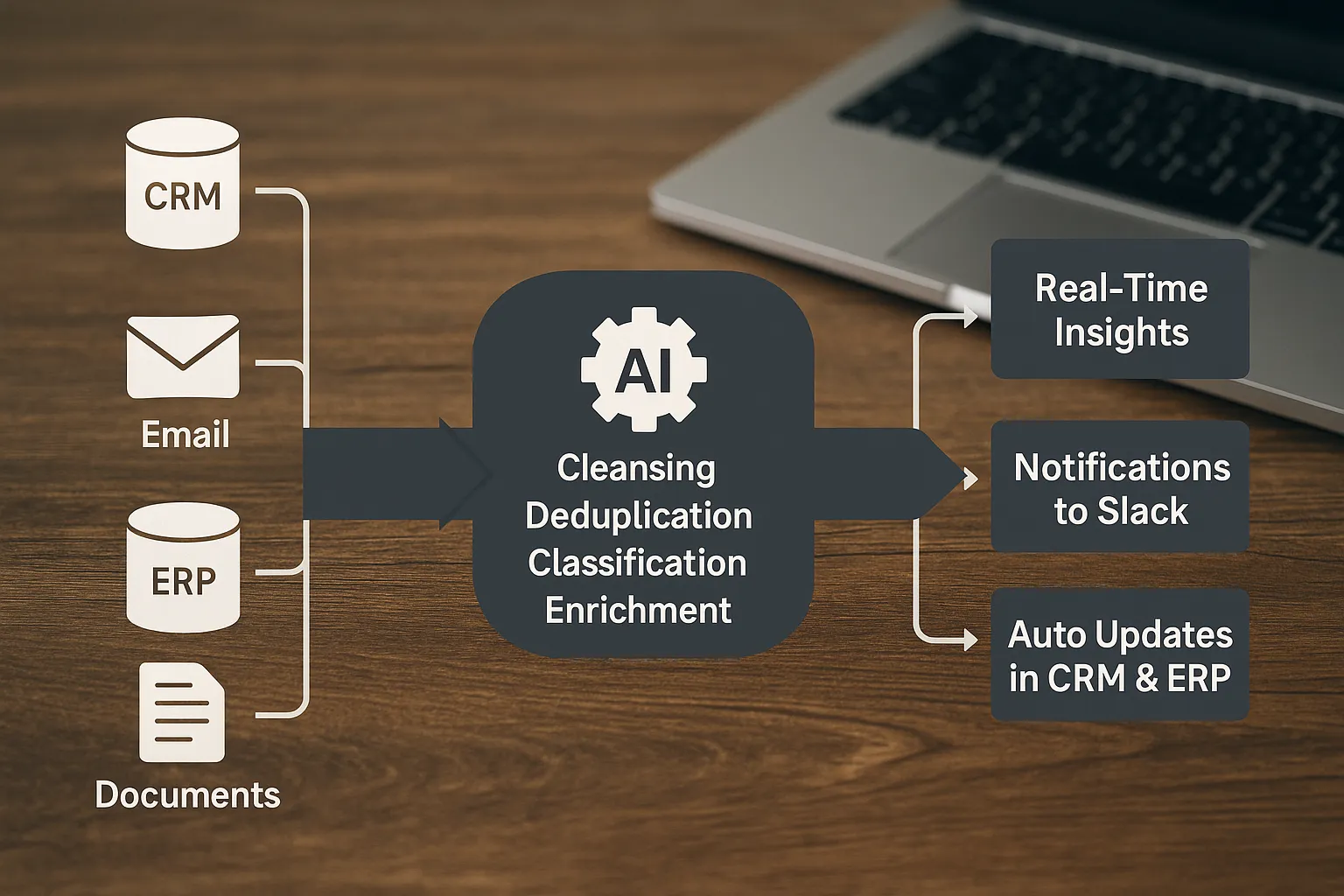
AI for data is the use of artificial intelligence to automate data ingestion, cleansing, enrichment, analysis, and distribution. Instead of exporting manually and patching things together with formulas, you let AI do the heavy lifting and push actions back into your systems.
Core elements that matter for SMBs:
Automated data ingestion, such as connections with CRM, ERP, email, WhatsApp, Slack, and accounting software.
Smart cleansing and matching, like finding duplicate customers, flagging unusual transactions, and normalizing names or addresses.
Semantic enrichment, for example automatically classifying product descriptions, enriching contact details, or matching companies by Chamber of Commerce ID or website.
Natural language to insights, ask questions in plain English and let AI run the right query or analysis.
Actions in the workflow, AI creates tasks in your CRM, sends alerts, updates pipeline fields, or triggers a follow-up.
Why this works now
Generative and predictive AI can understand unstructured data, recognize patterns, and summarize text or numbers. This shifts work from collecting and correcting data to interpreting and deciding.
McKinsey estimates that generative AI could unlock trillions in value globally, partly by accelerating knowledge work and improving data-driven decision-making. See McKinsey’s report The economic potential of generative AI for background and examples.
Use cases by sector
AI for data is not one size fits all. Below are typical quick wins for our audiences.
Wholesalers and distributors
Demand and inventory forecasting at SKU and customer level, with alerts for upcoming stockouts or aging inventory.
Price and margin analysis by channel and key account, including detection of anomalies in purchasing or transport costs.
Accounts receivable insights, automatic signals for payment risk and prioritization of follow-up.
B2B product suppliers and local manufacturing or installation companies
Planning and capacity allocation based on order intake, lead times, and staff availability.
Quote and job ticket analysis, automatically checking and summarizing hourly rates and material costs.
Combining service and maintenance data with sensor data or incident reports for predictive maintenance and SLA monitoring.
Accounting firms and legal boutiques
Automatic extraction from invoices and contracts, with classification, VAT and general ledger suggestions, and anomaly detection.
Fast management summaries per client, including KPIs and cash flow signals with source references.
Summarizing and categorizing specialist content, such as case law or compliance updates for internal knowledge bases.
B2B real estate brokers
Lead scoring and data enrichment, combining website behavior, email responses, and company data for prioritization.
Pipeline and deal forecasting, with automatic CRM updates and reminders on stalled deals.
Summarizing property and location information, such as zoning plans, permits, and market dynamics.
For more on what AI does to work processes, see our article on how AI is transforming workflow automation.
From question to value in 30 days, here is how to approach it
A large data warehouse is not always necessary to start. Pick a concrete decision or bottleneck and work backward.
Choose the business question Which decision needs to be made faster and more consistently, such as price adjustments, inventory purchasing, or lead prioritization? Define the KPI and working definitions so you can compare like with like later.
Connect the core systems Start with the minimum set, often ERP or accounting, CRM, and email. B2B GrowthMachine integrates with CRM, ERP, email, WhatsApp, Slack, accounting, or any API, so data automatically comes together in a current overview.
Automate cleansing and enrichment Use AI for deduplication, classification, and text extraction. Have anomalies labeled automatically and document the logic so you build consistency without hidden Excel formulas.
Deliver insight and action Build one live dashboard or summary with alerts and connect actions back to the CRM or task board. Think about automatically updating pipeline stages or creating follow-ups for at-risk customers.
Test, learn, and expand Measure time saved and accuracy, collect user feedback, and make iterative improvements. Then expand to the next process.
What does it deliver, in hard hours and euros?
You can estimate the gain with three variables: number of employees involved, hours per week spent on manual work, and hourly cost.
Monthly time saved is approximately: employees x hours per week x 4.
Monthly cost savings is: monthly time saved x hourly rate.
An example. Two employees each spend 6 hours per week on exports, cleansing, and reporting. At 55 euros per hour, the savings are roughly 2 x 6 x 4 x 55, so 2,640 euros per month. On top of that come better margin decisions, fewer errors, and faster follow-up that directly improve revenue and cash.
In our piece on AI versus manual work, we go deeper into the structural benefits of automation.
Which tools belong in an SMB data stack with AI
You do not need to invest in a complex platform right away. Start pragmatically.
Sources: CRM, ERP, accounting, email, chats, website forms, and if needed document storage.
Cleansing and enrichment: AI for matching, classification, entity extraction, and outlier detection.
Analytics and presentation layer: dashboards with natural language questions and automatic summaries per audience.
Action layer: write back to CRM, tasks in Slack, or email sequences for follow-up.
B2B GrowthMachine delivers sales and operations automation, an AI assistant for daily tasks, lead generation, marketing automation, and custom AI project development. We integrate with your existing systems and keep optimizing so the stack grows with your company.
For more inspiration on tooling and implementation, see our guide with AI tools to streamline tasks.
Data quality and governance, the prerequisites
AI can process bad data faster, but that does not make the outcome better. Set a few rules of the road:
Definitions and ownership: document what margin, MQL, or stock shortage means and who owns it.
Validation: use samples, double checks on key fields, and a feedback button for users.
Privacy and GDPR: minimize personal data, set access rights, and log what AI processes. For an accessible summary of the rules, see the Dutch Data Protection Authority (Autoriteit Persoonsgegevens).
Transparency: show the origin of numbers and make it possible to click from summary to source data.
Human-in-the-loop: for high-impact decisions, let AI propose and have an employee confirm or correct.
Pitfalls you want to avoid
Starting too broad, do not try to launch five dashboards at once. Start with one recurring decision that drives a lot of value.
Reporting only, without an action layer. Insights without follow-through deliver little.
Black box solutions, if nobody understands how a score or recommendation is produced, adoption stalls.
No maintenance, data and processes change. Plan periodic checks and continuous optimization.
For trends and how to ride the next wave of automation, read our view on the future of AI automation.
Practical mini scenarios to test tomorrow
Automatically extract invoice information into your accounting system, including VAT checks and a GL suggestion with anomalies flagged.
A/R aging analyses with automatic follow-up tasks for high risk accounts, including customer segment and contact history.
Detect stocked products with declining turnover and generate pricing or promotion advice, plus an alert to sales.
Automatically enrich and score leads with incomplete company information, then create a follow-up task in the CRM.
Project or service planning that automatically shifts when lead times change, with a notification to the planning team.

How to measure success
Time to insight: number of minutes from event to usable signal or summary.
Accuracy: percentage of correct classifications, matches, or extractions, measured with samples.
Adoption: how many users consult the insights or respond to alerts each week.
Cycle time: time from lead to deal, or from purchasing to delivery, before and after automation.
Financial impact: margin improvement, less shrink, or faster collections.
Frequently asked questions
What is the difference between AI for data and traditional BI? BI delivers reports based on predefined datasets and dashboards. AI for data also automates ingestion, cleansing, enrichment, and interpretation, and can write actions back to systems. You can also ask questions in natural language instead of only viewing prebuilt charts.
Do I need to build a data warehouse first? Not necessarily. Start with the data closest to your decisions, often ERP and CRM. As maturity grows, a data warehouse or lakehouse can make sense, but it is not required to see value within 30 days.
Is AI for data secure and GDPR compliant? Yes, as long as you apply data minimization, set up rights and logging properly, and define which data AI is allowed to process. Start with non-sensitive data, anonymize where possible, and involve your privacy officer. Also review the guidelines from the Dutch Data Protection Authority (Autoriteit Persoonsgegevens).
Where do I start if I have zero experience? Pick one repeatable use case with a clear KPI, connect two to three sources, and automate cleansing plus one alert or task. Work iteratively. Our introduction on how AI workflow automation transforms operations is a good starting point.
Will this replace my team? No. It removes repetitive work and gives employees better context. People still make decisions, maintain relationships, and adjust course. In our article on AI versus manual work we explain the division of roles.
What results can I expect, and when? Often you will see time savings and fewer errors within weeks. Financial impact, such as lower inventory or faster collections, follows once insights consistently lead to actions.
Can I combine this with existing tools? Yes. B2B GrowthMachine connects with CRM, ERP, email, WhatsApp, Slack, accounting, or any API. That way you keep working in the systems you already know, with AI as an accelerator.
Ready for faster insight with less manual work
With AI for data, you turn scattered exports into a reliable stream of insights and actions. You save time structurally, improve margins, and make processes scalable without adding extra headcount. Want to know where the biggest gains are for your business and how to set this up in practice, from the first use case to scalable workflows? Get in touch via B2B GrowthMachine and discover how our AI-driven sales and operations automation, integrations, and custom projects can accelerate your organization. Visit B2B GrowthMachine.