
Custom AI development: tailored solutions that accelerate processes
Dec 24, 2025
Your processes are full of smart exceptions and industry specific rules that standard software does not quite understand. That is exactly where custom AI development wins. Not extra layers of tools stacked on top of each other, but one tailored layer that seamlessly connects your data, decisions, and actions. The result is less manual work, fewer handoffs, and much faster cycle times across sales, service, and operations.
What is custom AI development, practically speaking?
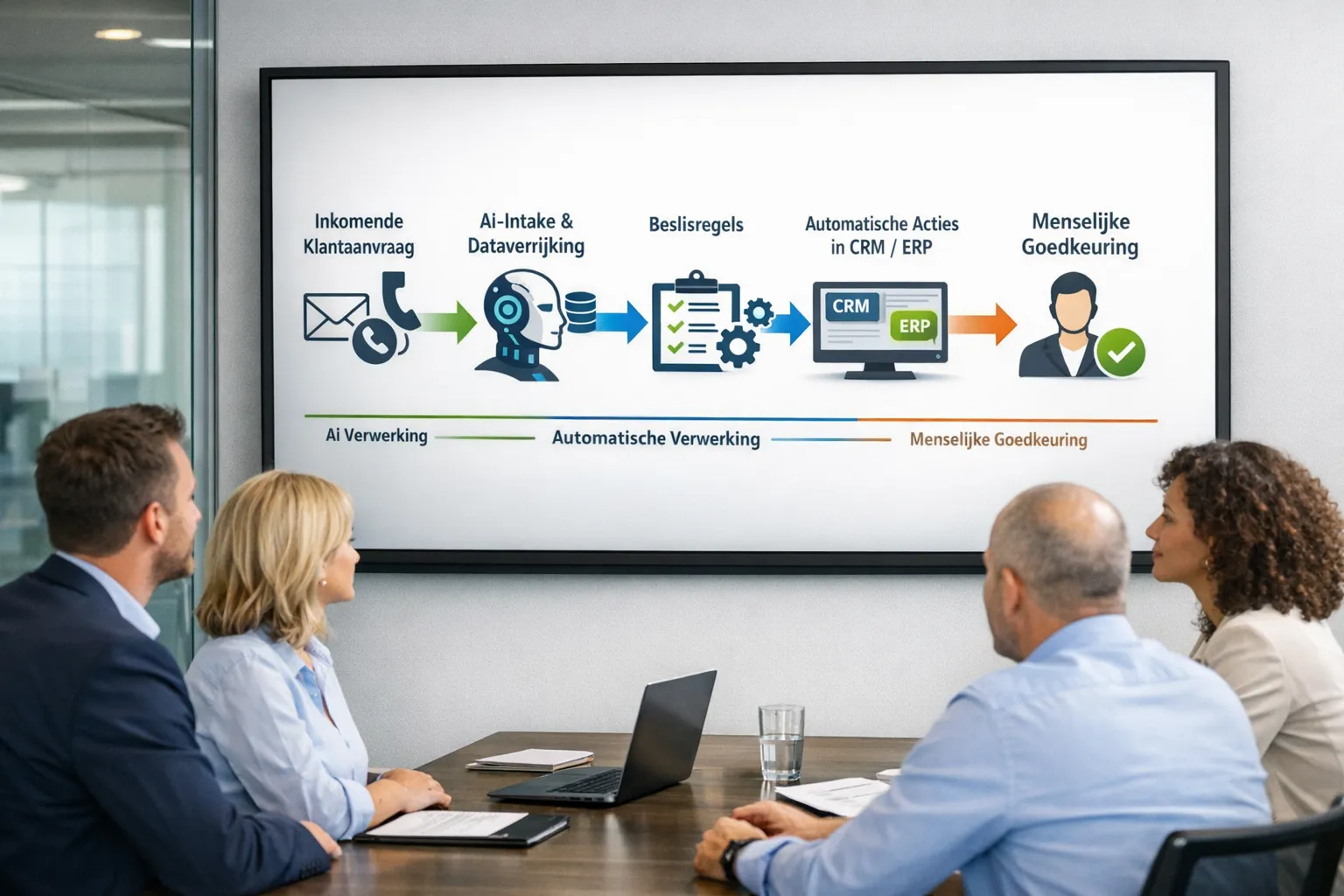
Custom AI development means translating your unique processes into a set of AI driven workflows, assistants, and agents that talk directly to your systems. Think ERP, CRM, WMS, accounting, email, WhatsApp, and planning tools. The core typically includes:
Smart intake, validation, and enrichment of data from multiple sources.
Decision logic that combines rules with AI models, including clear thresholds and fallbacks.
Orchestration of actions across your tools, without copy paste or queues between departments.
Human in the loop at critical moments, with logging and version control.
Continuous monitoring and optimization based on KPIs and feedback.
Instead of isolated AI features, you get one cohesive engine that makes every step in the process faster and more consistent.
Why tailored solutions speed up processes
Less friction at intake: AI reads emails, PDFs, and portal data, fills missing fields, checks references, and matches item numbers to your master data.
Faster decisions: combine business rules with AI scores for priority, risk, or pricing recommendations, and auto approve where it is safe.
Orchestration without context switching: one workflow that drives CRM steps, ERP reservation, quote generation, and communication.
Fewer handoffs: AI handles routine tasks directly, people focus on the exceptions that matter.
Learning from feedback: every correction or adjustment improves the next run, so performance increases over time.
Examples by industry
Wholesale and distribution: automatic quote drafts based on inventory, price tiers, and margin targets, followed by AI personalized follow up email. Order intake from email or EDI is verified, enriched, and booked into ERP. Signals for reordering or substitution when inventory risks appear.
B2B product suppliers: AI recommends bundles and alternatives, keeps technical datasheets consistent, and schedules samples. Service cases get automatic triage with parts recommendations.
Accounting firms and legal boutiques: AI reads documents, tags and classifies, and drafts responses or standard letters. GL coding and VAT checks become suggested tasks instead of manual work.
Installation and field services: intake, scheduling, and route optimization from incoming requests, with automatic materials lists and appointment confirmations.
B2B real estate brokers: matching leads to properties, data rich viewing appointments, automatic follow up with relevant comparables and terms.
Custom build or standard tool, how do you decide quickly?
Choose standard software if the process is generic, you have few system integrations, and you mainly need basic automation. Choose custom AI when:
The process is unique or delivers competitive advantage.
Multiple systems are involved and manual handoffs cause errors.
There is high volume or high cost of slow cycle times.
You need to combine clear rules with context that AI can interpret better than humans.
Compliance, audit trail, and brand tone must remain controlled.
Not sure about the AI core? Start with retrieval augmented generation, and only move to fine tuning when it is truly necessary. If you want to go deeper, read our practical guide on choosing an AI engine as you scale: Choose the right AI engine for growth.
Blueprint for custom AI that delivers speed
Data layer: secure integrations with CRM, ERP, email, WMS, accounting, and channels like WhatsApp and Slack.
Triggers and events: when the workflow starts, which exceptions stop the process, and what the fallback is.
Workflows: the end to end steps, from intake to booking and communication.
AI capabilities: extraction, classification, summarization, scoring, pricing recommendations, generation of quotes or answers.
Human in the loop: clear thresholds for manual review, with one click approve or correct.
Monitoring and governance: measurement points, quality checks, logging, model selection, and cost control.
For more on the layers and orchestration, see our guide on scalable automation: AI Business Process Automation.
Implement in 5 sprints of 2 weeks
Sprint 1, process selection and baseline: choose one bottleneck with a clear KPI target. Map data flows and rules and define the baseline.
Sprint 2, proof of concept with mock integrations: validate AI tasks on real data in a sandbox. Measure accuracy, latency, and edge cases.
Sprint 3, pilot with human in the loop: connect 1 or 2 systems, have employees review, and log all decisions.
Sprint 4, hardening and security: error handling, audit logs, access rights, and cost ceilings. Train the team on the workflow and tone of voice.
Sprint 5, rollout and optimization: scale to more channels, fully automate approved paths, and set a monthly improvement cadence.
If you want to run a risk and quality check in parallel, use the steps in: AI check, how to assess quality and risk.
Build the ROI case quickly
Determine the volume: how many times per month the task occurs.
Measure current cycle time and error rate.
Estimate realistic savings per task after automation, plus error reduction and less rework.
Add development costs and monthly run costs, subtract them from monthly savings.
Add the value of faster cycle time, such as higher conversion or lower wait times.
A simple calculation often shows quickly that custom solutions pay for themselves within a few months, because the biggest gains come from time and quality improvements on tasks that repeat every day.
Quality, security, and compliance, without slowing down
EU AI Act and GDPR: classify use cases correctly, document data flows, and run DPIAs where needed.
Limit personal data: minimize fields, mask where possible, automatically delete after use.
Source management and traceability: store the context and version of the sources used with every AI decision.
Cost and performance: use thresholds, caching, batching, and task specific model selection for speed and budget.
Fail safes: clear fallback to manual handling, including notifications and queues.
People and adoption, how to ensure success
New workflows require new routines. Train teams on both the what and the why, practice with realistic cases, and provide direct feedback. For sales and service teams, scenario practice is especially effective. For example, consider AI roleplay training for objection handling and conversation skills to help your team perform faster and more consistently in the new AI assisted way of working.
How B2B GrowthMachine helps
We deliver a plug and play AI growth engine for SMB teams, plus customization where it matters. You get:
Sales workflow automation, including follow ups, outreach, CRM updates, quotes, and pipeline management.
An AI assistant as a digital coworker for administration, planning, reporting, and research.
Sales and marketing automation for campaigns, sequences, lead nurturing, content, and customer engagement.
Lead generation with multichannel outreach, prospecting, data enrichment, and AI lead scoring.
Custom AI project development for agents and automations that fit your processes.
Integrations with CRM, ERP, email, WhatsApp, Slack, accounting, and other APIs.
Continuous optimization and 24/7 AI support.
Data driven insights via automated reports and dashboards.
Cost reduction through less manual work and fewer errors.
If you want a live pilot within 30 days that reduces cycle time or speeds up order intake, we build and measure it together with your team.
Frequently asked questions
When should I choose custom AI development and when a standard tool? Choose custom when the process is differentiating, touches multiple systems, or has high volumes and high cycle time costs. Standard tools are fine for generic, simple processes without complex integrations.
How quickly will I see results? With a focused use case, you can run a pilot within 4 to 6 weeks that delivers measurable time savings. Full rollout typically follows in 60 to 90 days.
Is custom work not expensive and risky? By starting small, with clear KPIs, human in the loop, and a sandbox, you keep risk low. ROI comes from daily savings and error reduction, not from one off projects.
What about security and the EU AI Act? We classify the use case, minimize personal data, log decisions, ensure human oversight, and run a DPIA where needed. This keeps speed and compliance balanced.
Will it work with my existing CRM and ERP? Yes, as long as there is an API or integration point. We start with the two most important systems and expand from there.
What if the model makes mistakes? Critical steps go through thresholds and review. Corrections are logged and used to improve the workflow, so quality increases over time.
Ready to cut cycle time in half where it matters?
Schedule a short strategy session with B2B GrowthMachine. Together we pick one process, deliver a working pilot in weeks, and measure the impact on time, quality, and cost. If it works, we scale up in a controlled way. Start today with a practical route to faster, smarter, and more profitable processes.