
Develop an AI Agent: A Simple Build Plan
Jan 23, 2026
Most “AI agent” projects fail for a boring reason: the agent is treated like a clever chatbot, not like a production workflow with inputs, permissions, checks, and monitoring.
If you’re building for a B2B SME (wholesale, distribution, accountancy, installation, or real estate), your goal is rarely “make text.” Your goal is “move work forward” without breaking your CRM data, sending risky emails, or creating compliance headaches.
Below is a simple, practical build plan to develop an AI agent that actually ships and keeps working.
What an AI agent is (in business terms)
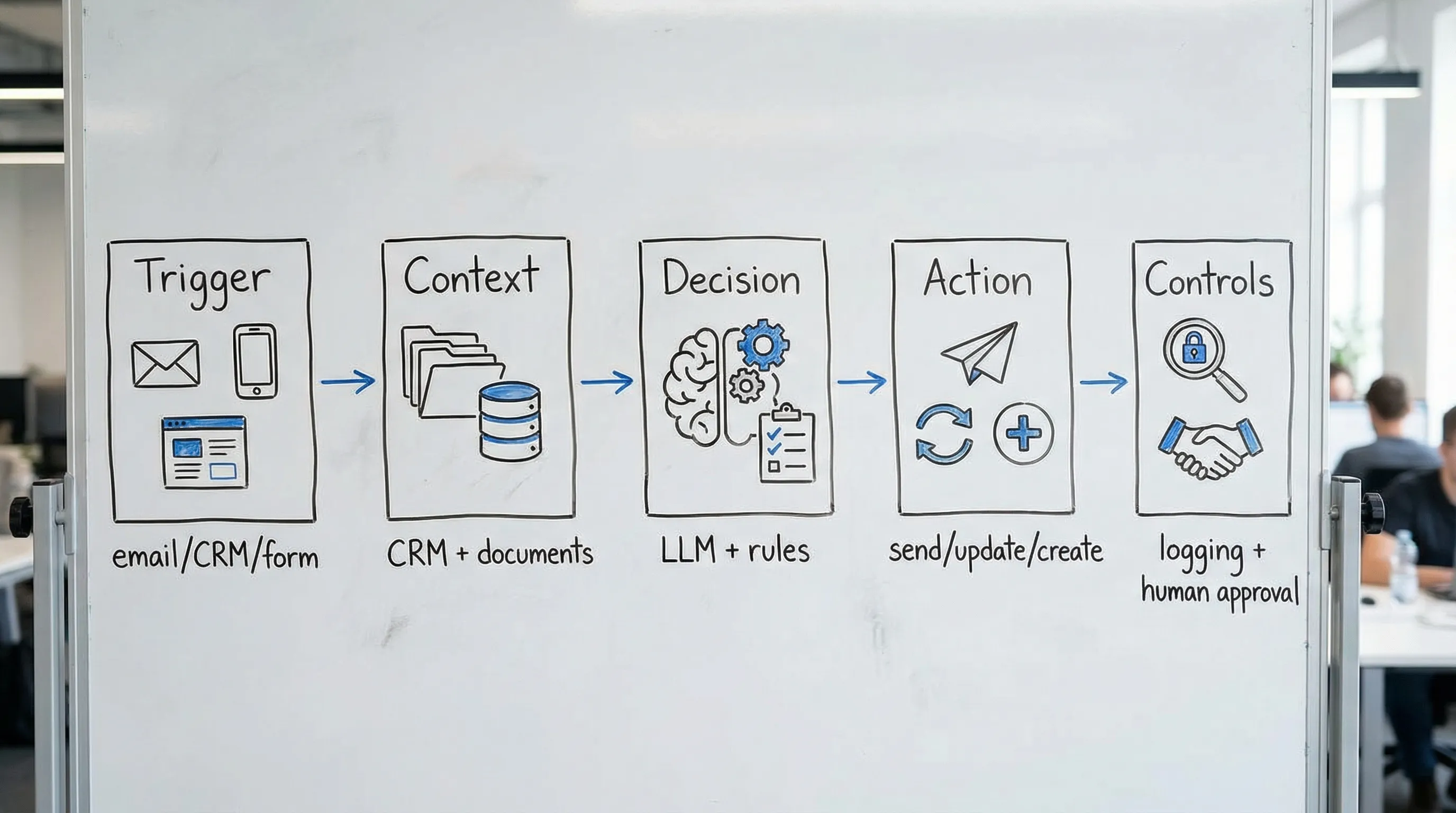
An AI agent is a system that can:
Understand a task request (from a trigger like an email, form, CRM update, or user message)
Pull the right context (from documents, CRM/ERP, past tickets, product rules)
Decide what to do next (based on policies and constraints)
Take action (send a message, draft a quote, update a record, create a task)
Log what happened so humans can review, correct, and improve it
In other words, an agent is not “the model.” It is the model plus orchestration, tools, guardrails, and feedback.
Step 0: Pick the right first agent (so you don’t waste a quarter)
Start with a workflow that is frequent, rules-based, and has a clear definition of “done.” Great first agents usually live in the space between customer communication and internal systems.
Good first-agent candidates in B2B SMEs:
Speed-to-lead agent: qualify inbound leads and create the right next step in CRM
Quote drafting agent: create a draft quote or proposal package from a request
Customer service triage agent: route tickets, summarize, and suggest next actions
Invoice or document intake agent: extract fields, validate, and prepare for booking
Avoid these as your first agent:
Anything that changes master data in ERP without controls
Anything that makes final credit, pricing, or legal decisions
Anything that requires “perfect” reasoning with missing inputs
Step 1: Define the job, boundary, and success metrics
Write a one-page “agent contract.” If you cannot describe the job crisply, you cannot test it.
Include:
Job-to-be-done: “When X happens, produce Y for role Z.”
Definition of done: exact output artifacts (CRM fields updated, tasks created, draft email prepared).
Out of scope: what the agent must never do.
Business KPI: pick 1 or 2.
Examples of strong KPIs:
First response time (minutes)
Time to quote (hours)
Hours recovered per week (operator time saved)
Error rate or rework rate (percentage)
Keep it measurable. If you can’t measure it, the agent will turn into a demo.
Step 2: Map the workflow as states, not as prompts
Most teams jump straight into prompt writing. Instead, map the workflow as a small state machine.
For each state, define:
Trigger: what starts the step
Inputs: required fields and where they come from
Checks: validation rules (including “stop if missing X”)
Action: what gets created/updated/sent
Escalation: when to hand off to a human
A useful constraint for early builds: keep the agent to 3–6 states. If it needs 15 states, you are trying to automate a process that is not standardized.
Step 3: Choose your agent mode (copilot vs. limited autonomy)
Most SMEs should start with a copilot-style agent that drafts and prepares actions, with a human approving the final step.
Pick one:
Copilot mode: the agent drafts, summarizes, suggests, and prepares updates. Humans click approve.
Limited autonomy: the agent can take specific low-risk actions automatically (create CRM tasks, tag records, send internal notifications).
The biggest practical difference is permissions. If the agent can write externally to customers, you need stronger safeguards.
Step 4: Build the context layer (this is where accuracy comes from)
When people say, “the model hallucinates,” what they often mean is: the system had no reliable context.
For most business agents, you want retrieval-augmented generation (RAG) or structured lookups, not fine-tuning.
Your context layer should answer:
What data sources are “truth” (CRM, ERP, product catalog, price rules, terms)
How the agent retrieves them (search, query, knowledge base)
How to prevent stale or conflicting information
Practical tips:
Prefer small, trusted sources over “everything in SharePoint.”
Use versioned documents for policies (pricing rules, service SLAs, legal clauses).
Cache frequently used reference data (like product specs) if latency matters.
If you operate in Europe or process EU customer data, treat context as part of your compliance scope. The agent can only be as safe as the data it can access.
For general risk guidance, it’s worth skimming the OWASP Top 10 for LLM Applications so your team designs with common failure modes in mind.
Step 5: Define tool access and permissions like you would for a junior employee
An agent that can “do anything” will eventually do something you did not intend.
Create an explicit tool policy:
Read tools: CRM lookup, ERP order status, knowledge search
Write tools: create task, update specific CRM fields, draft email (not send)
Restricted tools: sending external messages, changing pricing, issuing credits
Important engineering constraints that prevent costly incidents:
Idempotency: repeated runs should not duplicate actions.
Rate limits: especially for email and CRM APIs.
Audit logs: who triggered what, what context was used, what was changed.
Step 6: Design outputs as structured artifacts, not prose
If the agent outputs free-text for operational steps, you will fight formatting, ambiguity, and inconsistent CRM hygiene.
Instead:
Require structured fields (for example: lead stage, next step, confidence, missing data)
Separate “explanation” from “action fields”
Add validation rules (reject output if required fields are missing)
This is one of the simplest ways to increase reliability without “more AI.”
Step 7: Add guardrails that match your risk
Guardrails are not a single feature. They are a set of controls at different points.
High-impact guardrails for B2B agents:
PII and sensitive data filters (block or redact)
Allowed claims policy (no promises about pricing, delivery, legal terms)
Grounding requirement (answers must cite internal source snippets, or refuse)
Human approval gates for external communications or financial impact
For broader governance, the NIST AI Risk Management Framework is a solid reference to align stakeholders on what “safe enough” means.
Step 8: Create a test set before you build (yes, before)
A test set is a collection of real, representative cases your agent must handle.
Build it from:
30–100 real emails, tickets, or quote requests (anonymized)
Known edge cases (missing data, unclear request, wrong customer)
Failure cases you have seen humans struggle with
Define what “pass” means per case. Your first version does not need to be perfect, but it must be consistent and safe.
Step 9: Deploy in stages: shadow, then assisted, then limited autonomy
A safe rollout sequence for most SMEs:
Shadow mode: the agent produces outputs, but nothing is acted on. Humans compare.
Assisted mode: the agent prepares drafts and updates for approval.
Limited autonomy: the agent takes specific low-risk actions automatically.
Each stage should have:
A rollback plan
A named owner (not “the team”)
A weekly review of failures and cost
Step 10: Monitor what matters (quality, cost, and business impact)
If you don’t measure, you won’t know whether your agent is improving or silently drifting.
Minimum monitoring for production:
Automation rate: how often the agent can complete its job without escalation
Human correction rate: how often people change its outputs
Business KPI movement: response time, time to quote, conversion, hours recovered
Safety events: PII flags, policy violations, blocked outputs
Unit cost: cost per completed case (including human review time)
A simple 10-day build plan you can actually execute
Here’s a pragmatic cadence that fits most B2B teams.
Days 1–2: Scope and contract
Choose one workflow
Define success metrics and “never do” rules
Select your rollout mode (shadow, assisted)
Days 3–5: Context and integration
Identify the 2–4 core data sources
Implement retrieval or structured lookups
Wire minimal tool access (read first, then limited writes)
Days 6–7: Guardrails and structured output
Add validation rules
Add approval gates
Build an audit log
Days 8–10: Testing and rollout
Run your test set
Fix the top failure modes
Go live in shadow or assisted mode
This is enough to get signal. If you cannot ship something useful in 10 days, the scope is too large.
People and skills: who owns the agent after launch?
A production agent is a living system. It needs ownership across business and technical sides.
At minimum, assign:
A business owner (defines “good,” approves changes)
An automation/integration owner (keeps workflows and APIs stable)
A quality owner (tests, monitors failures, maintains the test set)
If you need to hire for senior go-to-market, sales, or digital leadership to support AI-driven change, a specialized partner like Optima Search Europe can be helpful for executive and commercial roles in fast-growing firms.
When to build it yourself vs. use a platform
Build it yourself when:
Your process is unique and you have strong in-house engineering capacity
You can maintain integrations, monitoring, and governance
Use a platform or implementation partner when:
You need speed and reliability more than custom engineering
You want agents connected to CRM/ERP/email with real guardrails
You want continuous optimization without adding headcount
B2B GrowthMachine is designed for exactly that kind of rollout: plug-and-play AI tools (prompting, workflows, agents) plus integration and ongoing optimization, so your agent becomes a repeatable business system, not a one-off prototype.
The next best step
If you’re about to develop an AI agent, don’t start with tooling. Start with a single workflow, a clear “agent contract,” and a staged rollout plan.
If you want help scoping the right first agent and getting it integrated safely into your CRM/ERP and outreach workflows, you can explore B2B GrowthMachine at b2bgroeimachine.nl.