
Help AI: Turn Requests Into Automated Actions
Jan 21, 2026
Every growing SME has the same hidden bottleneck: requests.
“Can you pull a quote for this customer?”
“Can you check if the invoice was paid?”
“Can you update the CRM after that call?”
“Can you confirm stock and delivery date?”
Each request looks small. Together they create context switching, inconsistent execution, and a dependency on a few key people who “know how it works.”
Help AI is a practical way to fix that: it turns everyday requests into automated actions that run through your systems with the right approvals, logs, and guardrails.
Why requests are the real productivity leak in B2B SMEs
In wholesale, distribution, accountancy, installation, and B2B real estate, a large part of work is not “deep work.” It’s reactive operations:
A customer asks for an order status update, someone checks ERP, then replies.
A lead replies “send info,” someone searches the right PDF, then writes an email.
A supplier sends a price update, someone updates a sheet, then updates the quote template.
The problem is not effort. It’s repeatability.
Requests usually fail in one of three ways:
They are unstructured. The request misses key inputs (customer ID, product code, deadline, priority).
They are trapped in a channel. The request sits in email, WhatsApp, Slack, or “someone’s head.”
They don’t trigger execution. Even when the answer is known, the action is manual (copy/paste, CRM updates, follow-ups).
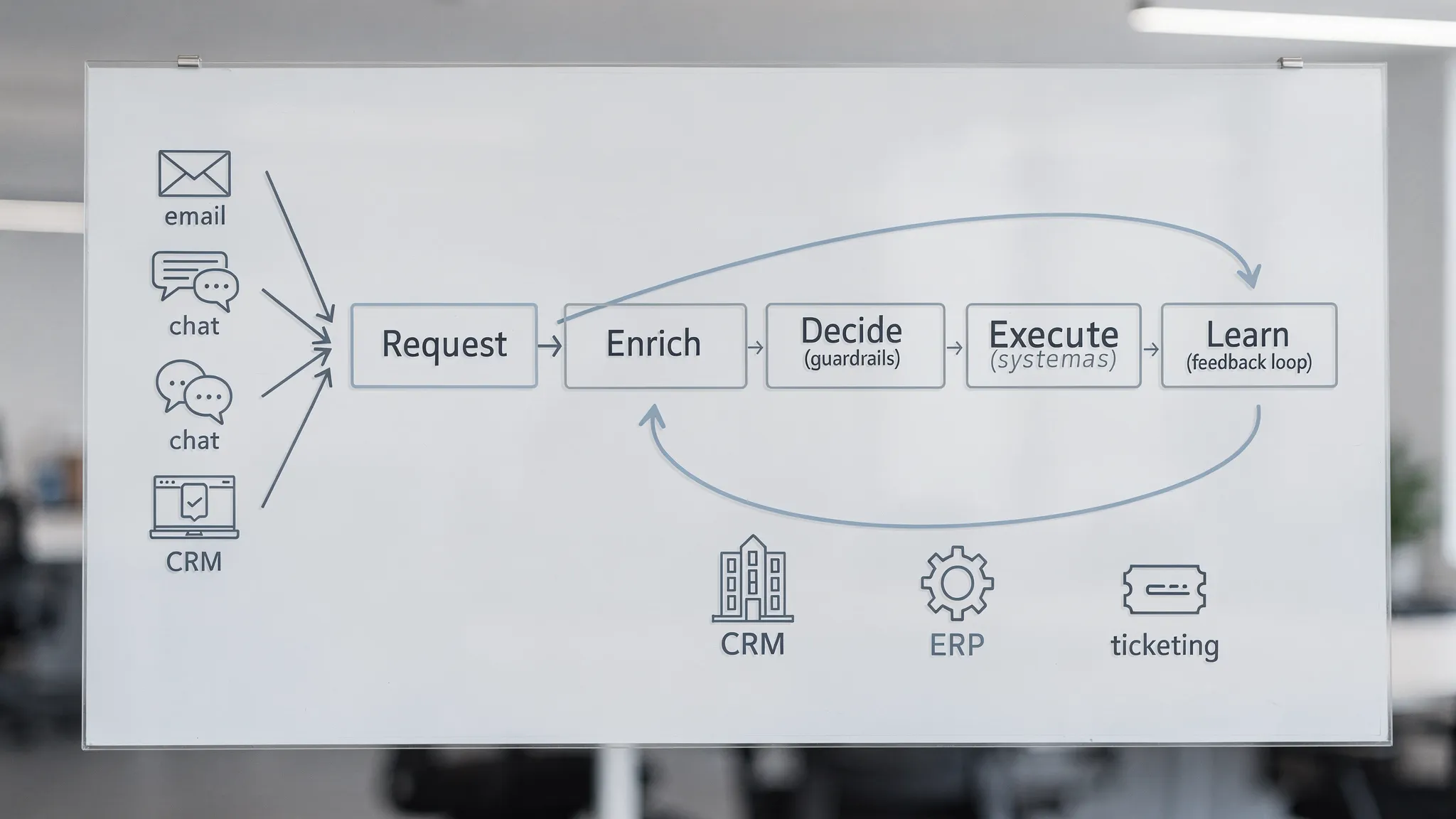
Help AI solves this by treating requests as a system that can be captured, understood, routed, executed, and improved.
What Help AI is (and what it is not)
Help AI is not “just a chatbot.” A chatbot answers questions. Help AI does work.
A production-grade Help AI setup combines:
Intake: where requests arrive (email, web form, chat, WhatsApp, tickets, CRM).
Understanding: classify intent, extract entities (customer, product, invoice number), detect urgency.
Context: retrieve the right internal facts (CRM account details, ERP order, policy snippets, contract clauses).
Decision logic: rules and thresholds (when to approve, when to ask clarifying questions, when to escalate).
Action: execute steps in connected systems (create task, update CRM, generate quote draft, send status update).
Control: approvals, logging, and safe fallbacks.
If you want “AI that helps,” this is the difference between “nice demo” and “operational impact.”
The Request-to-Action Loop (a blueprint you can actually implement)
You can implement Help AI without boiling the ocean by standardizing one loop.
1) Capture: make requests detectable and routable
Start by choosing one primary entry point per request type.
Examples:
Quote requests: one email alias like quotes@, or one CRM form.
Order status: customer portal, support inbox, or chat.
Accounting requests: one ticket queue or client portal.
You can still accept requests from anywhere, but you want one “system of record” so requests don’t get lost.
2) Normalize: convert messy messages into a clean request object
Help AI needs a consistent structure to work reliably.
A useful “minimum viable request” typically includes:
Request type (quote, status update, invoice question, scheduling, lead qualification)
Who is asking (account, contact, internal requester)
The entity (order number, invoice number, SKU list, address)
Deadline / urgency
Desired output (email reply, PDF draft, CRM update)
If the incoming message misses information, your automation should ask one clarifying question instead of guessing.
3) Enrich: pull context from systems, not from memory
This is where most SMEs win big.
Instead of asking a colleague “do we have stock?” Help AI can retrieve:
Stock level and lead time (ERP)
Customer tier and pricing rules (CRM/CPQ)
Open tickets and recent complaints (service desk)
Payment status and outstanding invoices (accounting)
If you want the AI to be trustworthy, ground it in your sources of truth. For governance and risk language, it helps to align with well-known frameworks like the NIST AI Risk Management Framework.
4) Decide: add guardrails before you automate actions
Not every request should trigger a fully autonomous action.
A safe decision layer includes:
Confidence checks: “Do we have the right customer and order?”
Policy checks: “Are we allowed to share this information?”
Thresholds: “If discount > X%, require approval.”
Escalation rules: “If message contains legal dispute terms, route to a human.”
This is also where privacy and compliance fit. If you operate in the EU, you should be aware of obligations around risk, transparency, and controls under the EU AI Act.
5) Execute: turn decisions into real system changes
Execution is where value becomes measurable.
Examples of actions that tend to be high-ROI:
Create or update a CRM record (lead, deal, activity)
Generate a quote draft based on rules and product data
Send an order status update using ERP fields
Create a follow-up task with the right owner and SLA
Update pipeline stage when certain signals occur
Important: execution must be idempotent (running twice should not create duplicates), and actions should be logged.
6) Confirm: close the loop with humans and customers
Two confirmations matter:
Customer confirmation: “Here’s the quote draft, confirm quantities and delivery date.”
Internal confirmation: “This was updated in CRM, approve before sending.”
You do not need humans in the loop everywhere, but you do need them at the points where errors are expensive.
7) Learn: use outcomes to improve prompts, rules, and routing
Help AI gets better when it learns from what happened:
Was the quote accepted?
Was the answer correct?
Did the request bounce between teams?
Did it violate policy or require rework?
This is how “automation” becomes a system, not a one-off workflow.
Practical Help AI examples by industry (requests you can automate first)
Below are patterns that tend to work especially well for the audiences B2B GrowthMachine serves.
Wholesale businesses and distributors
Common requests that are ideal for Help AI:
“Can you confirm stock and lead time?”: fetch ERP stock, lead times, substitutions, then draft reply.
“Can you create a quote for these SKUs?”: validate customer pricing tier, apply rules, generate a quote draft.
“Where is my shipment?”: retrieve shipment status, carrier tracking reference, and expected delivery window.
The win is not just speed. It’s consistency, fewer pricing mistakes, and shorter time-to-quote.
B2B product suppliers
High-impact request flows:
Inbound distributor questions: classify, enrich with product specs, attach the right documents.
Lead routing: score lead fit, assign owner, create tasks, send a tailored first reply.
RFP and spec requests: draft structured responses grounded in your approved product data.
Legal and accounting boutiques
Help AI shines when intake is structured and audit trails matter:
Client email triage: classify tax, payroll, annual accounts, advisory, then route to the right queue.
Document intake: extract key metadata (period, entity, totals), request missing items.
Status updates: generate client-friendly updates based on your internal workflow stage.
You get fewer interruptions and a more predictable client experience.
Local manufacturing and installation companies
Best request-to-action candidates:
“Can you schedule this job?”: parse address, preferred window, technician skill tags, then propose slots.
“What’s the ETA?”: pull schedule and parts availability, send proactive updates.
Job handover summaries: turn technician notes into structured CRM records and follow-up tasks.
These workflows reduce phone calls and prevent “tribal knowledge” bottlenecks.
B2B real estate brokers
Where Help AI creates leverage:
Listing inquiry intake: extract requirements, match to inventory, propose shortlists.
Meeting scheduling: propose slots, capture attendee details, log to CRM.
Follow-up automation: after a viewing, send recap, next steps, and capture interest signals.
The result is faster response times and better pipeline hygiene.
The most common failure mode: automating before you standardize
Most teams try to “add AI” on top of chaos. That creates brittle automations and mistrust.
Before you automate, standardize two things:
Standardize your request categories
You do not need 50 categories. Start with 5 to 8:
Quote request
Status update
Lead qualification
Scheduling
Invoice or payment question
Data update (CRM/ERP)
Complaint or escalation
This is enough to route work and measure volume.
Standardize your action catalog
Define what actions Help AI is allowed to take.
Examples:
Allowed: draft an email, create a CRM task, fetch order status, generate a quote draft.
Restricted: approve discounts above threshold, change master data in ERP, send legal commitments.
Help AI becomes safe when it has a clear “permission boundary.”
Guardrails that make Help AI usable in real operations
If you want Help AI to be trusted by sales ops, finance, and leadership, build these controls early.
Human-in-the-loop approvals for high-impact actions
A simple rule: if an action can affect revenue, cash, or legal exposure, require approval.
Examples:
Discount exceptions
Credit or payment plan promises
Contract language changes
Logging and replay
Your system should record:
The request text
The data sources used
The final output
The actions taken
Who approved what
This is not bureaucracy. It is how you debug, improve, and stay audit-ready.
Safe fallbacks
When in doubt, Help AI should:
Ask a clarifying question, or
Route to a human with a pre-filled summary and recommended next step
The goal is not “AI autonomy.” The goal is operational throughput without errors.
How to measure Help AI success (without vanity metrics)
Help AI should show up in metrics your CFO and ops lead care about:
Hours recovered: time saved per request times volume.
Cycle time reduction: time-to-quote, time-to-first-response, time-to-resolution.
Error reduction: fewer pricing mistakes, fewer missing fields, fewer CRM hygiene issues.
Commercial lift: faster follow-up, higher reply rates, higher conversion from quote to order.
If you can’t measure it, it’s not automation, it’s experimentation.
A pragmatic 14-day pilot to launch Help AI
You can pilot Help AI in two weeks without disrupting operations, if you keep the scope tight.
Days 1 to 3: pick one request type and define “done”
Choose a request with high frequency and clear outcomes, for example quote drafts or order status updates.
Define:
What counts as a successful output
Which systems provide truth (CRM, ERP, accounting)
Which actions are allowed
Days 4 to 7: build intake, enrichment, and a draft output
Focus on:
Reliable parsing
Correct context retrieval
Draft generation that your team can approve
Do not chase perfection. Chase repeatability.
Days 8 to 14: add guardrails, approvals, and measurement
Add:
Approval flows
Logging
Simple dashboards or weekly reporting
A feedback loop (what was corrected, what was accepted)
By day 14, you should be able to answer: “How many requests did we process, how much time did we save, and what broke?”
Why Help AI also improves team wellbeing (not just efficiency)
When you remove repetitive requests, you reduce interruptions, after-hours inbox pressure, and the “always on” feeling that hits sales ops and admin teams hardest.
Some leaders complement operational fixes with wellbeing practices and resources, for example exploring holistic approaches to reducing stress alongside process redesign. The key point is that sustainable growth is easier when both your systems and your people are supported.
Where B2B GrowthMachine fits
Help AI is most powerful when it is connected to your real workflow, not when it lives in a separate tool.
B2B GrowthMachine helps SMEs implement Help AI as an operational layer across sales and operations, combining prompting, workflows, and AI agents with integrations into the tools you already use (CRM, ERP, email, WhatsApp, Slack, and APIs). The goal is simple: turn requests into automated actions, safely, measurably, and without adding headcount.
If you want to explore a focused Help AI pilot, start with one request type, one outcome, and one connected workflow. That is how you get from “AI that answers” to “AI that executes.”