
Development of AI: From Prototype to Production
Jan 20, 2026
A lot of AI work looks impressive in week 1 and quietly dies in week 6.
The reason is simple: a prototype proves that something can work, but production requires that it works reliably, securely, measurably, and inside your real processes (CRM, ERP, inboxes, quoting, ticketing, approvals). For SMEs in wholesale, distribution, professional services, installation, and B2B real estate, that difference is the gap between “cool demo” and “cost-cutting growth engine.”
Below is a practical, end-to-end view of the development of AI from prototype to production, with the engineering and operational realities that usually get skipped.
Prototype vs. production: the gap you actually need to close
A prototype is typically:
Built on clean examples, not messy live inputs
n- Evaluated with “looks good” feedback, not acceptance criteria
n- Run by a single builder, not owned by a team
n- Safe because it is not connected to anything important
Production is the opposite. Once AI is wired into quoting, customer communication, lead routing, finance workflows, or compliance checks, you need guarantees around:
Quality: outputs are consistently usable, not occasionally brilliant
Control: clear rules for what AI can do, and what requires a human
Security and privacy: data handling, logging, access control, vendor contracts
Measurement: ROI metrics tied to cycle time, error rate, throughput, conversion, cost-to-serve
Maintainability: prompt/model changes, retries, fallbacks, and versioning
That is why “building AI” is less like creating a single clever prompt, and more like creating a system.
Step 1: Define the job to be done (and how you will score success)
Before choosing models or tools, define one operational “job” the AI should do. Not a broad goal like “use AI in sales,” but a narrow unit of work.
Good SME examples:
Turn an inbound request into a structured CRM record and route it correctly
Draft a first quote response using ERP pricing rules and product availability
Summarize a customer call and push the right fields into the CRM
Classify incoming AP invoices and flag exceptions for review
Then define success in a way Finance and Ops will accept.
A simple production-minded KPI set is usually:
Cycle time (time-to-quote, time-to-first-response, lead-to-meeting)
Quality / error rate (wrong routing, wrong price tier, missing fields)
Throughput (requests handled per day per person)
Commercial impact (conversion rate, margin leakage reduction)
Adoption (how often humans accept, edit, or ignore the AI output)
If you cannot define success, you will not know when to ship, and you will not know what to improve.
Step 2: Build a prototype that resembles reality (not a demo)
A strong prototype is not “AI in a chat window.” It is a thin version of the real workflow.
Use live-ish inputs early
Most AI failures come from input reality:
Incomplete forms
n- Messy PDFs
n- Email threads where the latest message is not the full context
n- Product names that do not match your ERP master data
n- Customer requests that combine multiple jobs in one sentence
So, prototype with:
The last 50 to 200 real examples (sanitized if needed)
The real edge cases (angry customers, rush orders, weird attachments)
Decide the AI pattern you are actually using
“AI” is not one thing. For SMEs, most production wins fall into a few patterns:
Extraction and structuring: pull fields from emails, PDFs, forms
Classification and routing: intent detection, priority scoring, team assignment
Grounded Q&A: answer using internal knowledge (policies, catalog, contracts)
Drafting with constraints: generate text that must follow brand, policy, or legal rules
Decision support: recommend next-best-action with evidence
You will build faster when you stop treating everything as free-form generation.
Step 3: Turn “it works sometimes” into acceptance criteria
Production requires you to say what “good” means.
A practical approach is to define acceptance criteria that combine:
Task accuracy: did it classify correctly, extract the right fields, propose the correct next step
Business rules: did it respect pricing tiers, territories, SLAs, compliance boundaries
Safety constraints: no sensitive data leakage, no invented claims, no unauthorized actions
For example, a quote-drafting AI might only ship when:
It extracts customer name, company, requested SKUs, quantities correctly above an agreed threshold
n- It never invents prices and always references the ERP price source or escalates
n- It generates emails that match approved tone and disclaimers
This is where many teams discover that the hard part is not the model, it is the definition of correctness.
Step 4: Production architecture basics (what you need, even in a small stack)
To move from prototype to production, most SMEs need the same backbone components.
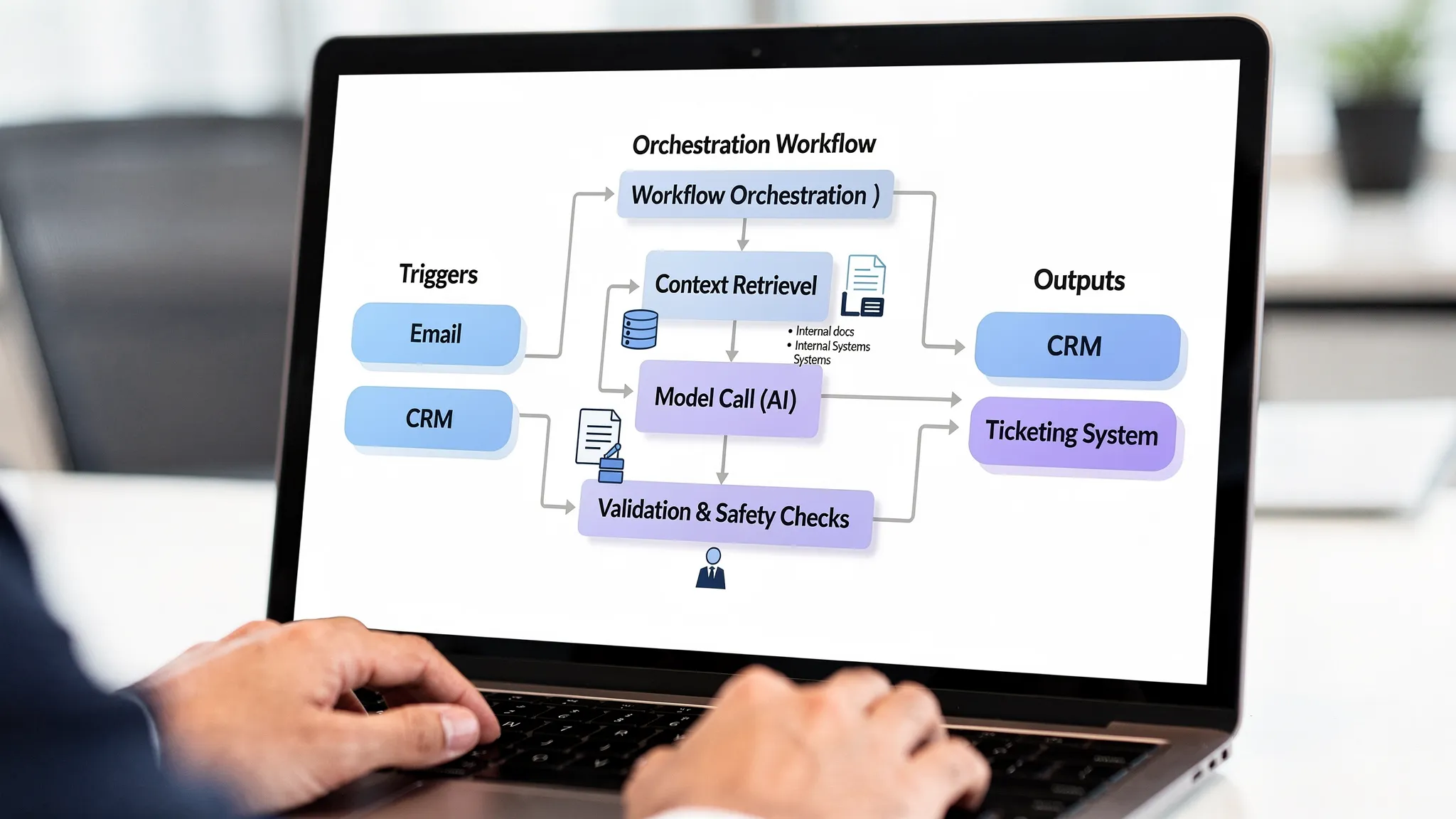
Orchestration layer (workflow engine)
You need a place to define:
Triggers (new email, CRM stage change, form submit, webhook)
Steps (enrich data, retrieve context, call model, validate output)
Branching (if confidence low, route to human review)
Retries, timeouts, and fallbacks
This is how AI becomes repeatable operations, not an “assistant someone remembers to use.”
Context layer (so the model can be right)
In B2B, correctness depends on internal context:
Product catalog and pricing logic
n- Customer account status
n- Delivery constraints
n- Contract terms
n- Policies and playbooks
Often the most reliable first step is retrieval-based grounding (commonly called RAG), where the system fetches relevant internal sources and instructs the model to answer using only those sources.
Integration layer (CRM, ERP, email, ticketing)
The value is realized when AI can:
Read from systems safely
Write back in controlled ways
Log what it did
In early production, keep write actions conservative (drafts, suggestions, or queued updates) and expand later.
If you want a deeper view on integration pitfalls, see the practical guidance in AI integration with CRM and ERP: do’s and don’ts.
Step 5: Add controls that make AI safe to operate
When AI touches revenue, compliance, or customer trust, you need guardrails that are operational, not theoretical.
Human-in-the-loop is not a weakness
For many SME workflows, the best design is:
AI drafts or recommends
A human approves or edits
The system learns from the edits
This is especially important for:
Quotes and pricing
n- Legal/accounting communications
n- Credit and risk decisions
n- Anything under regulatory scrutiny
Logging, auditability, and explainability
At minimum, store:
Input reference (not always the raw content, depending on privacy)
Retrieved sources used for grounding
Model output
Validation results
Human edits and final decision
This is not bureaucracy. It is how you debug issues, prove compliance, and improve performance.
NIST’s AI Risk Management Framework is a useful reference for thinking about governance and operational controls without jumping straight to enterprise overhead.
Security and privacy checks
Even SMEs should standardize a few controls:
Data minimization (send only what is needed)
Role-based access to prompts, logs, and connectors
Vendor due diligence (DPAs, training opt-out, data retention)
Secrets management (no API keys in scripts)
In the EU, the EU AI Act raises the bar on governance for certain use cases, especially those that can affect people’s rights or access to services. Even if your use case is low-risk, building basic controls now prevents painful retrofits later.
Step 6: Validate outputs like you would validate a process
A common trap is “prompt tweaking forever.” Production teams treat AI output like any other system output: they validate it.
Practical validation patterns:
Schema validation: output must match required fields and formats
Business-rule validation: price tier exists, SKU exists, delivery date not impossible
Grounding checks: answer must cite internal source snippets, or decline
PII detection: prevent accidental exposure
Confidence gating: low-confidence results go to review
If your AI will run daily, validation is what keeps it from silently drifting into expensive mistakes.
Step 7: Deploy with release discipline (shadow, canary, rollback)
SMEs often think “release discipline” is for big tech. It is not.
AI changes faster than traditional software because:
Prompts evolve
n- Models get updated
n- Your data changes
n- Edge cases accumulate
A safe deployment approach:
Shadow mode
Run the AI in parallel, but do not let it affect outcomes. Compare AI suggestions with human decisions for 1 to 3 weeks.
Canary release
Let AI handle a small subset of volume, a region, a product category, or one team.
Rollback plan
Define what happens when quality drops:
Switch to manual workflow
n- Disable specific actions (writes to CRM, sending emails)
n- Route everything through human approval
This is the difference between controlled iteration and operational chaos.
Step 8: Monitoring that is tied to business outcomes
Most teams monitor “uptime” and forget the part that matters: is it still helpful?
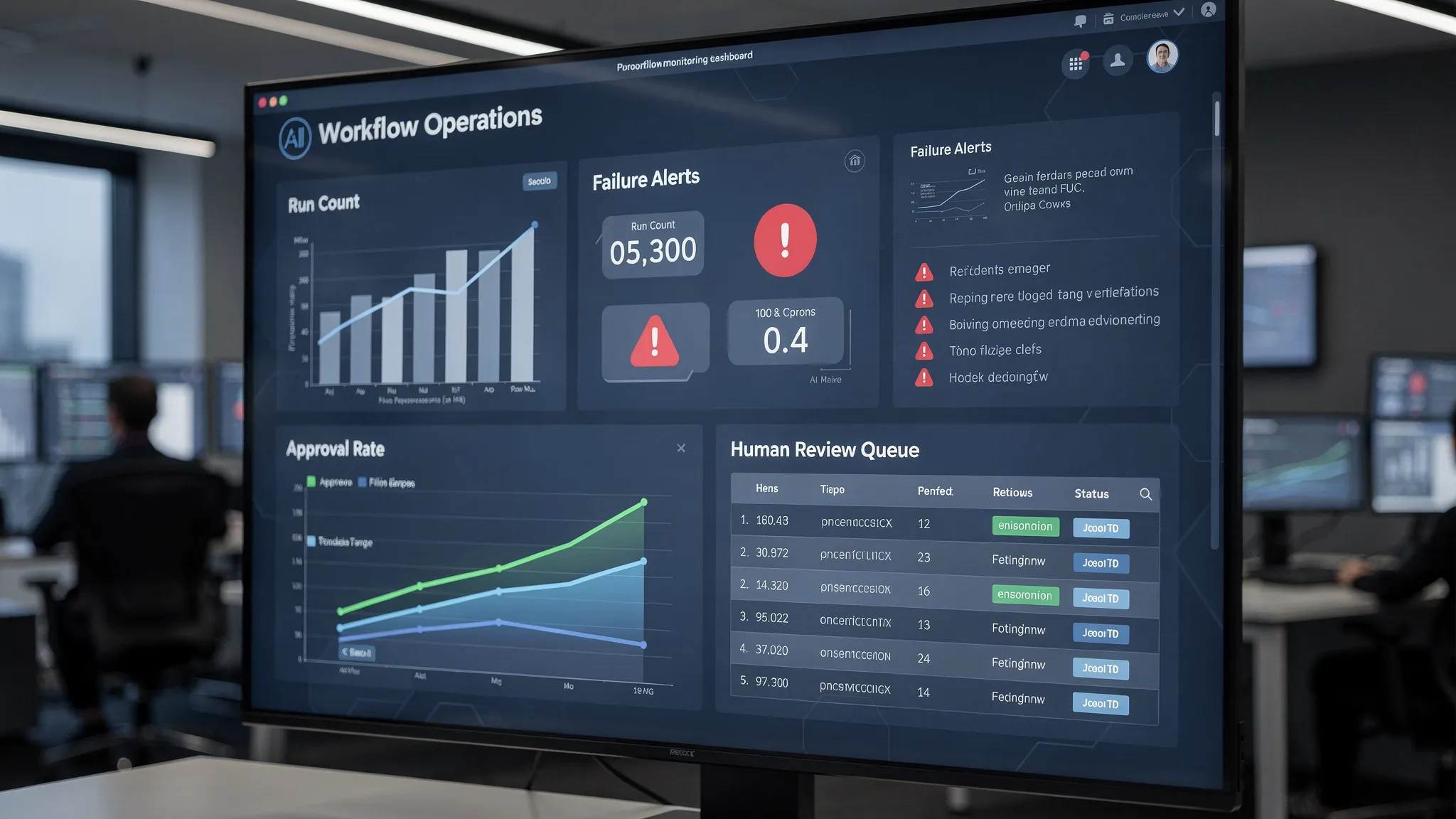
Production monitoring should include:
Quality drift: rising edit rates, lower groundedness, more exceptions
Workflow health: retries, timeouts, integration failures
Cost: cost per handled request, cost per quote drafted, token usage anomalies
Adoption: usage by team, approval rate, time saved
Commercial metrics: time-to-first-response, quote turnaround, conversion
If you are implementing AI in critical workflows, a dedicated “checks” layer makes this concrete. This guide can help you think through that monitoring design: AI checks for production monitoring that prevents errors.
Step 9: Treat adoption as a deliverable, not a hope
The development of AI succeeds or fails on the shop floor.
Especially in wholesale, distribution, accounting boutiques, and installation companies, the people closest to the work will reject a system that:
Adds steps
n- Hides logic
n- Creates rework
n- Makes them feel monitored rather than supported
Practical adoption tactics that work in SMEs:
Put one process owner in charge (Ops, Sales Ops, Finance Ops)
Start with one workflow that removes annoying repetitive work
Keep humans in control of high-impact decisions
Show wins weekly with simple metrics (hours recovered, cycle time reduction)
When people see time returned to them, adoption becomes pull, not push.
A quick example: from creative prototype to repeatable production
It helps to remember that “prototype to production” is not unique to B2B. Even consumer businesses that sell personalized products need quality controls, repeatable workflows, previews, and customer support loops.
For example, brands offering custom artwork like personalized pet portraits from PawsLife depend on a production system that reliably turns customer inputs into approved outputs, with clear revision flows and consistent fulfillment standards. The same mindset applies in B2B AI: reliable inputs, defined checks, predictable handoffs, and feedback loops.
Where B2B SMEs should start (to ship something real)
If you are trying to move from prototype to production in the next 30 to 90 days, start with a workflow that is:
High-frequency (daily or weekly)
Rule-influenced (so you can validate it)
Painful today (manual copying, slow responses, constant interruptions)
Low-to-medium risk (drafts, internal summaries, structured intake)
Great first candidates:
Inbox triage and routing into CRM or ticketing
Meeting recap to CRM updates
Quote-first response drafting with strict pricing rules
Document intake (invoices, contracts, requests) into structured fields
Then build the production spine early: orchestration, context, integrations, logging, validation, and monitoring.
The bottom line
The real development of AI is not the moment you get a good output.
It is the moment you can confidently say:
This workflow runs every day
It is integrated with our systems
It is measured on business outcomes
It fails safely
It is monitored and improved continuously
That is how AI becomes a growth engine for SMEs, not a one-off experiment.
If your team already has a promising prototype and you want to harden it into a production workflow (integrations, guardrails, monitoring, adoption), B2B GrowthMachine is built specifically for that “last mile” from demo to dependable operations.