
Help You Help: AI Workflows That Save Hours
Jan 6, 2026
Most SME teams don’t lose time on “big projects.” They lose time on micro-requests.
“Can you send me the latest price list?”
“What’s the status of this order?”
“Can you summarize this contract?”
“Can you update the CRM after that call?”
“Can you pull a quick report for the weekly meeting?”
Individually, each request looks harmless. Collectively, they become the invisible tax that keeps sales, operations, and admin teams working late.
That’s where the help you help mindset is useful: build AI workflows that handle the repetitive parts of helping, so your team can focus on decisions, relationships, and edge cases.
Below are practical AI workflow patterns that consistently save hours in B2B environments like wholesale, distribution, installation companies, accounting boutiques, and B2B real estate.
What “Help You Help” means in practice
In most B2B companies, your best people spend a surprising part of their day acting like a human router:
Reading inbound messages
Figuring out what’s being asked
Hunting for information across systems
Formatting an answer
Logging what happened
Nudging the next step forward
AI workflows are not about replacing your team. They’re about removing the manual glue work so your experts can spend more time on high-value help.
A good “help you help” workflow has two goals:
Reduce interruptions (fewer Slack pings, fewer back-and-forth emails, fewer status calls)
Make outcomes repeatable (same request, same process, same quality)
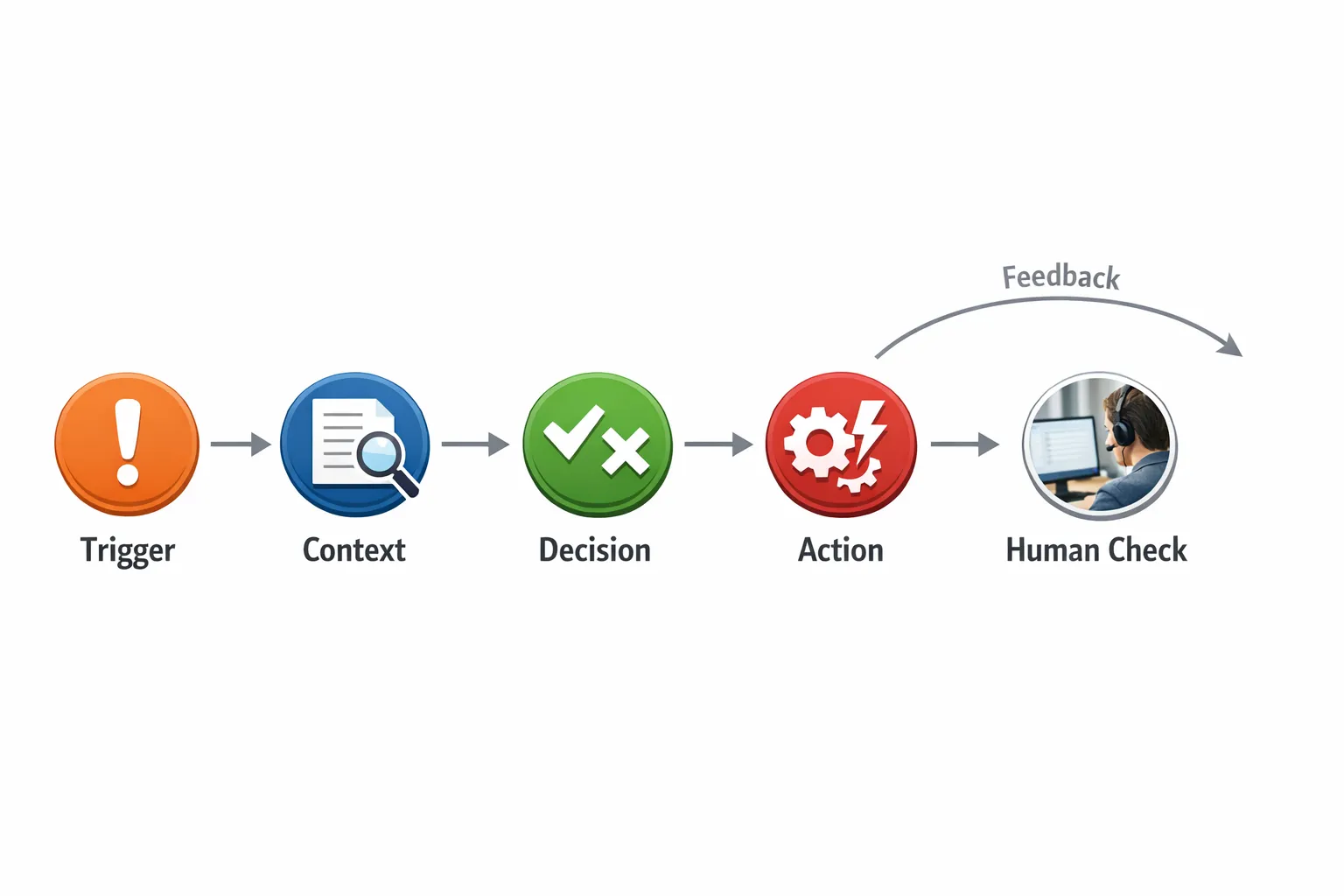
The 5 building blocks of time-saving AI workflows
Nearly every workflow that saves real hours can be designed with the same structure:
Trigger: an email arrives, a form is submitted, a deal stage changes, a ticket is created.
Context: pull the right data (CRM, ERP, inbox history, price sheets, policy docs, project notes).
Decision: classify, validate, score, detect missing info, select a playbook.
Action: draft reply, update records, create tasks, route to the right owner, generate a document.
Human check: approve, edit, or override when risk is high.
If you skip the human check, you risk quality and compliance. If you skip context, you get generic output. The leverage comes from combining both.
AI workflow 1: Inbox triage that turns messages into structured work
Best for: distributors, B2B suppliers, installation companies, professional services
If your sales or operations inbox is a catch-all, you already know the pain:
Requests arrive in different formats
Important messages get buried
The same clarifying questions get asked repeatedly
A high-impact workflow is AI triage + structured handoff:
Read inbound email (or WhatsApp, web form, shared inbox)
Classify intent (quote request, order status, complaint, document request, scheduling, invoice question)
Extract key fields (company, product, quantities, delivery date, PO number, address, urgency)
Check for missing info and draft one clean follow-up question
Route to the right owner (sales, support, finance, planning)
Create a ticket or task with the extracted fields
Where the hours disappear today is not “answering the email,” it’s the context switching and the back-and-forth. This workflow reduces both.
Guardrails that matter:
Never send automatically for high-risk categories (complaints, legal, cancellations)
Enforce a structured template for extracted fields so the downstream process stays clean
Log the original message and the AI’s extracted summary for auditability
AI workflow 2: Quote-first-response automation (without committing to pricing)
Best for: wholesale, distribution, local manufacturing, B2B product suppliers
Most quote requests don’t need an instant final quote. They need an instant, competent first response that:
Confirms you understood the request n- Collects missing requirements
Sets expectations on timeline
Prepares internal data so quoting is faster
A practical workflow:
Detect a quote request
Pull customer history (terms, margin bands if you use them, past products, notes)
Identify missing requirements (delivery address, lead time, specs, Incoterms, installation constraints)
Draft a first response email that confirms scope and asks only what’s needed
Create an internal “quote brief” for your sales or ops team
This saves hours because it eliminates the repeated manual steps of: reading, rewriting, re-asking, and reconstructing the same quote context.
Human-in-the-loop tip:
Let AI draft and structure. Keep price, discounts, and contractual commitments behind approval.
AI workflow 3: Meeting recap to CRM, tasks, and follow-ups
Best for: any B2B sales team, especially small teams juggling many accounts
Sales teams don’t lose because they don’t know what to do next. They lose because the “next steps” never get recorded, delegated, or scheduled.
A time-saving workflow:
After a call, capture notes (manual notes, transcript, or a quick voice memo)
Summarize the conversation into:
key pains and priorities
stakeholders and roles
objections raised
agreed next steps with dates
Draft a customer follow-up email
Create internal tasks (send spec sheet, confirm stock, prepare proposal, loop in finance)
Update the CRM fields consistently
This is the help you help pattern applied internally: your team stops being the bottleneck between a conversation and execution.
Quality guardrails:
Require the owner to approve the customer-facing recap before it’s sent
Make CRM updates idempotent (avoid duplicate tasks and duplicate notes)
AI workflow 4: “Where is my order?” status updates that don’t steal your ops team’s day
Best for: distributors, wholesalers, installation firms, B2B suppliers
Status requests are pure interruption. Customers ask because they don’t have visibility, and your team answers by hunting across systems.
A workflow that saves hours:
Detect a status question (email, portal form, WhatsApp)
Identify the order (PO number, customer name, reference, email thread)
Pull status from ERP/WMS/shipping tracking
Generate a clear update:
current stage
next milestone
ETA (with confidence level if available)
what the customer needs to do (if anything)
Escalate exceptions to a human (delay, backorder, address issue, missing payment)
The goal is not a fancy chatbot. The goal is fewer internal interruptions and faster, consistent responses.
AI workflow 5: Exception handling for scheduling and dispatch (installation and field service)
Best for: installation companies selling to businesses, local manufacturing with delivery or onsite work
The real operational cost is not the plan, it’s the exceptions:
technician sick
parts not available
customer site not ready
job takes longer than expected
An AI-assisted exception workflow can:
Detect an exception signal (inventory shortfall, schedule conflict, missed milestone, inbound customer message)
Collect the relevant context (job scope, SLA, location, assigned tech, required materials)
Propose 2 to 3 resolution options (reschedule windows, split visit, alternate tech, partial delivery)
Draft a customer update that is clear and professional
Create internal tasks and notify the right people
This helps your planners and project leads “help faster” without manually rewriting the same messages and rebuilding the same context.
AI workflow 6: Contract, compliance, and document intake that produces usable summaries
Best for: accounting firms, legal/accounting boutiques, B2B brokers handling lots of documents
Document work is classic “hours leakage”:
A PDF arrives
Someone scans it for key clauses
Someone extracts the important dates
Someone flags risks
Someone writes an email summary
A workflow that saves time while staying responsible:
Ingest document (contract, SOW, NDA, supplier agreement)
Extract key fields (parties, dates, termination, payment terms, liability caps, renewal)
Identify missing pages or signature blocks
Produce a structured summary for internal review
Draft a client-facing message that explains what matters in plain language
Important: AI should support review, not replace it. For regulated or high-risk decisions, keep a clear approval step and retain source references.
For general risk guidance around AI systems and governance, frameworks like the NIST AI Risk Management Framework are worth aligning with, even for SMEs.
AI workflow 7: Weekly reporting that turns metrics into decisions (not dashboards)
Best for: owners, managers, sales ops, operations leads
Many SMEs already have data, but reporting still eats time because it’s manual and repetitive:
export CSVs
merge spreadsheets
write a narrative
explain anomalies
A modern reporting workflow:
Pull metrics from the systems you already use (CRM, accounting, ticketing, project tools)
Compare to last week and last month
Flag anomalies (pipeline drop, conversion changes, overdue quotes, aging receivables)
Generate a short narrative:
what changed
why it might be happening
what to do next
Send to the right channel (email or Slack)
The win is not “more reports.” It’s faster weekly decision-making with less manual prep.
The hidden multiplier: better web forms and intake surfaces
Many “help” workflows start with messy intake. If your website forms are unclear, customers will email free-form requests, and your team will keep paying the manual parsing cost.
If improving your intake experience is part of your plan, partnering with a team that can build conversion-focused pages and integrate forms into your systems can be a strong move. For example, custom web design can be especially useful when you want lead capture, quote requests, and routing to connect cleanly into your CRM and automation workflows.
How to choose the right workflow first (so you actually save hours)
The best first workflow is usually the one with:
High volume (happens daily)
Clear rules (you can define what “done” means)
Low risk (mistakes are easy to catch)
Painful context switching (requires jumping between tools)
A simple way to shortlist candidates is to track interruptions for one week. Every time someone asks for help, log:
what the request was
where the info lived
how long it took end-to-end
what could have gone wrong
Patterns show up fast.
Implementation checklist: what makes these workflows work in real companies
AI workflows fail when they stay in “prompt demo” mode. They succeed when they are treated like operations.
Focus on these practical foundations:
Define a measurable outcome
Examples:
Reduce first response time on inbound requests
Reduce manual touches per quote
Increase % of requests routed correctly on first pass
Reduce time spent on weekly reporting
Put context behind the workflow
If the AI can’t reliably access the right customer, order, or document context, output quality will be inconsistent.
Add human checks where it matters
Use approval steps for:
pricing and discounts
contractual language
regulatory or compliance decisions
sensitive customer situations
Build feedback into the process
Every time a user edits an AI draft or changes the classification, capture that signal. It’s how workflows improve week over week.
Where B2B GrowthMachine fits
If you want these workflows to run end-to-end (not just generate text), the hard part is usually orchestration: connecting inboxes, CRMs, ERPs, and team channels, then keeping everything monitored and updated.
B2B GrowthMachine is built for AI-driven sales and operations automation with workflows and agents that integrate into the tools SMEs already rely on. If you’re trying to remove hours of repetitive work from your sales and operations week, start by mapping one high-volume “help” process and turning it into a workflow you can measure.
If you want support designing and implementing a first workflow (with the right guardrails), explore B2B GrowthMachine at b2bgroeimachine.nl.