
Personalized AI Assistant for Busy Account Teams
Jan 11, 2026
Busy account teams do not struggle because they lack tools. They struggle because every “small” finance task is tied to context: a client contract, a chart of accounts, a payment term exception, a policy decision, a deadline, or a compliance requirement.
That is why a generic AI chatbot rarely sticks in finance. It can draft an email, but it does not know your approval rules. It can summarize an invoice, but it cannot reliably code it to your ledger structure. It can explain VAT in theory, but it cannot apply your internal playbook without making risky assumptions.
A personalized AI assistant for busy account teams is different. It is designed to work inside your reality: your systems, your templates, your controls, and your client or vendor history. The result is not “AI that writes,” it is AI that helps you close the month, protect margins, and reduce errors.
Why generic AI tools break down in finance work
Most accounting and finance teams try AI in the simplest way first: copy-paste a prompt into a general model and ask it to help. The first few wins feel great, then adoption stalls. The reasons are structural.
Finance work is context-heavy and exception-driven
In finance operations, 80% of the volume may look repetitive, but the 20% of exceptions create most of the risk.
A generic assistant cannot see:
Your customer-specific payment terms and dispute patterns
Your approved wording for dunning and collections
Your capitalization policies or expense thresholds
Your internal controls (segregation of duties, approvals, audit trail)
Your preferred reporting definitions and KPI formulas
Without that context, the AI either refuses to answer (too cautious) or answers confidently with invented details (too risky).
Hallucinations are not “annoying,” they are operational risk
In marketing, a wrong sentence can be edited. In accounting, a wrong assumption can trigger:
Incorrect postings and rework n- Incorrect customer communication
Delayed close and missed deadlines
Compliance issues (especially when PII or sensitive documents are involved)
This is why finance-ready AI needs guardrails, grounding, and human-in-the-loop checks.
Finance teams need traceability, not magic
If an assistant suggests a journal entry or flags an anomaly, the team needs to know:
What sources were used
What rule triggered the suggestion
What confidence level applies
Who approved the action
That is how you make AI usable in environments where audits, client questions, and internal controls are part of daily operations.
What “personalized” really means for an AI assistant in accounting
Personalization is not “it knows my name.” For account teams, personalization means the assistant can reliably operate within your specific finance environment.
A practical personalized AI assistant typically combines three layers:
1) A knowledge layer (your policies and your truth)
This is where you store and control what the assistant is allowed to reference, for example:
Month-end close checklists
Posting rules and coding guidelines
Client onboarding playbooks
Templates (engagement letters, payment reminders, variance narratives)
FAQ and internal wiki content
The assistant should answer using those sources first, not generic internet knowledge.
2) A workflow layer (do the work, not just talk about it)
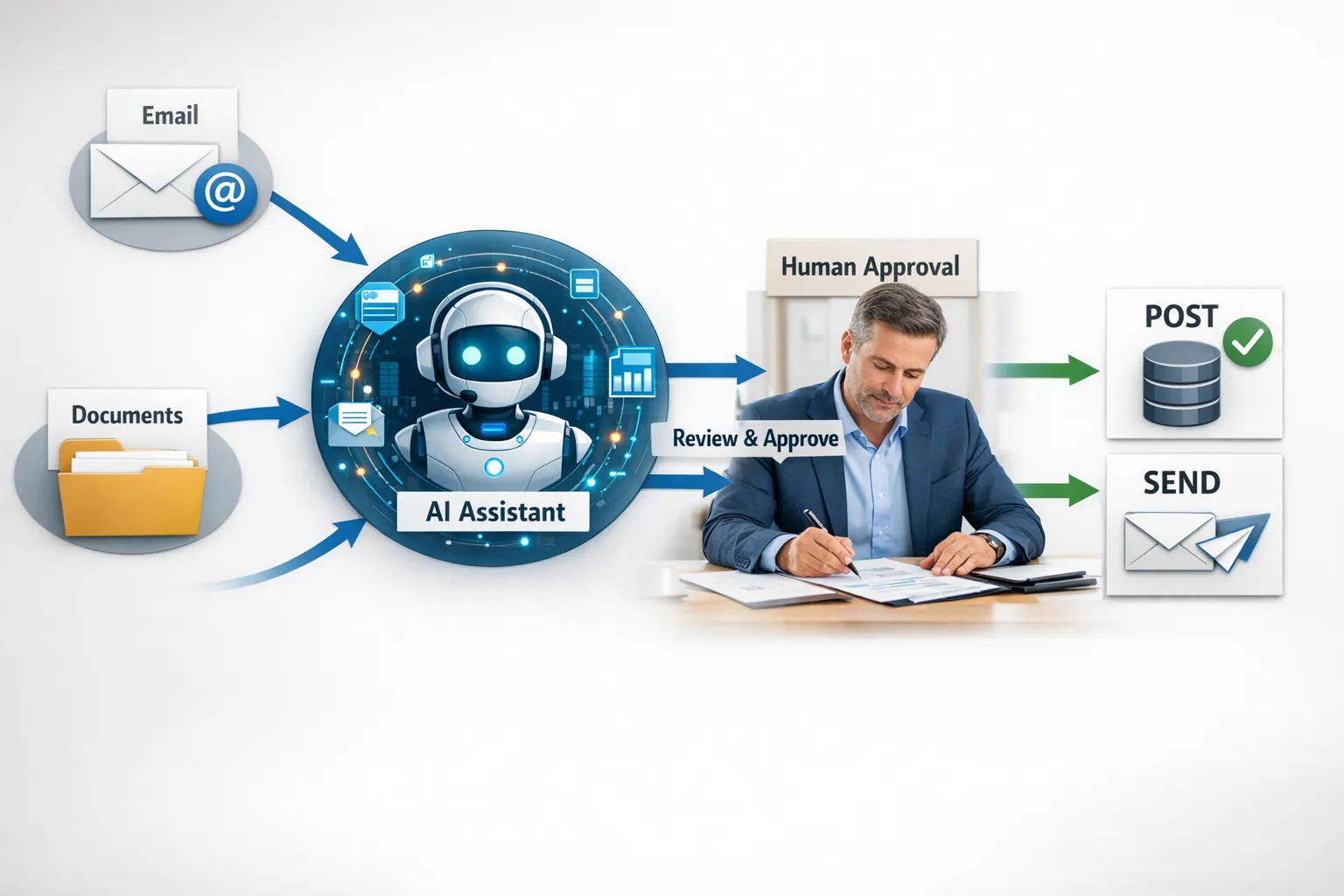
The biggest time savings come when AI is connected to workflows. That can include:
Drafting and routing emails for approval
Creating tasks when documents arrive
Updating CRM/ERP fields after specific events
Generating a first-pass reconciliation summary
Building a weekly KPI narrative from exported data
This is where “chat” turns into operational throughput.
3) A control layer (permissions, approvals, audit trail)
For finance, this layer is not optional. It includes:
Role-based access (what the assistant can read and write)
Approval steps for sensitive actions
Logging and traceability
Output validation (format checks, missing fields, policy compliance)
High-impact use cases for busy account teams (where AI actually saves hours)
The best use cases share one characteristic: high volume, clear rules, and frequent context switching. Below are practical patterns that work in real teams.
Inbox triage for finance and shared mailboxes
Shared mailboxes (billing@, finance@, ap@) become a queue of interruptions. A personalized assistant can:
Categorize messages (invoice request, dispute, payment proof, vendor question)
Extract key fields (invoice number, amount, due date)
Draft a response using your approved templates
Create tasks for the right owner, with context attached
The key is that the assistant drafts and routes, but a human approves before sending when the risk is high.
AP invoice intake and coding suggestions
Invoice processing is repetitive until it is not. The assistant can help by:
Reading invoices and extracting structured data
Flagging missing required fields (PO number, VAT ID, bank details)
Suggesting GL codes based on your historical patterns and rules
Escalating exceptions (new vendor, unusual amount, duplicate risk)
This is especially valuable for wholesale, distributors, and installation companies where invoice volume is high and coding consistency matters.
AR follow-ups that are consistent, polite, and effective
Collections is a mix of timing, tone, and accuracy. A personalized assistant can generate follow-ups that:
Match your tone and escalation policy
Reference the correct invoices and due dates
Include payment links or bank details when appropriate
Adjust the message based on client history (repeat late payer vs one-off issue)
The assistant should also log actions so the team can see what happened and when.
Month-end close support (checklists, variance narratives, status reporting)
Close work is not only posting entries. It is also coordination and communication.
A personalized assistant can:
Turn a close checklist into automated task creation and reminders
Draft variance explanations from a provided export (with sources cited)
Create a management-ready “close status” summary from task completion
Prepare an “open items” report for follow-up
This reduces the invisible work that drains senior accountants: chasing updates and rewriting the same narratives.
Client onboarding and compliance packet preparation
For accounting firms and finance teams serving B2B clients, onboarding is often document-heavy. A personalized assistant can:
Provide the exact document checklist per client type
Validate submissions (what is missing, what is inconsistent)
Produce a standardized intake summary for the team
In professional services environments (including law firms with complex billing and matter management, such as Henlin Gibson Henlin), the same pattern applies: high volumes of documents and strict requirements, where speed matters but mistakes are expensive.
A pragmatic 30-day rollout plan that finance teams can live with
The biggest implementation mistake is trying to automate everything at once. Finance teams win by shipping one narrow workflow, measuring it, then expanding.
Week 1: Pick one workflow and define “done”
Choose a process with clear boundaries. Good candidates:
AP intake for one vendor segment
Shared mailbox triage for finance@
AR follow-ups for invoices past due by 14+ days
Define acceptance criteria such as:
Time saved per week
Error rate targets
What must be approved by a human
What data sources are allowed
Week 2: Build the assistant’s knowledge pack
This is where personalization begins. Collect:
Templates and standard replies
Policy documents and coding rules
Examples of “good” and “bad” outputs
Then implement a structure where the assistant is instructed to cite internal sources and to ask clarifying questions when required fields are missing.
Week 3: Connect systems and add guardrails
A finance-ready assistant becomes valuable when it can operate where work happens:
Email and calendars
Document storage
CRM/ERP/accounting tools
Slack or Teams
Add controls early:
Permissions by role
Approval steps
Logging (who did what, and why)
Week 4: Measure, harden, and expand
Review what happened in production:
Which exceptions occurred most?
Where did humans override the assistant?
Which fields are often missing upstream?
Use these insights to refine prompts, rules, and validation, then expand to the next workflow.
If you want a deeper view on safe rollout controls and governance, B2B GrowthMachine’s checklist-style approach can help, see their guide on safe AI adoption for SMEs.
Security, privacy, and compliance: what to get right (without slowing down)
Finance teams handle sensitive information daily: invoices, bank data, payroll-related items, contracts, and customer PII. A personalized assistant should be designed to minimize exposure.
Design principles that work in finance
Least privilege access: the assistant only accesses what it needs for the workflow.
Data minimization: do not feed full documents if only 5 fields are needed.
Human approval for high-risk actions: sending payment reminders, posting entries, changing master data.
Audit-ready logging: prompts, sources used, outputs, approvals.
Clear retention rules: define what is stored, where, and for how long.
For EU-based teams, also consider GDPR requirements and the evolving expectations under the EU AI Act, especially for documentation, risk management, and transparency.
How to calculate ROI in a way finance leaders trust
The cleanest ROI model for an AI assistant in accounting is to track hours recovered and error reduction.
A practical approach:
Baseline the process today (average handling time, weekly volume, rework rate)
Pilot the assistant on a subset (one mailbox, one entity, one vendor group)
Measure deltas weekly
Common KPIs to track:
Handling time per item (email, invoice, follow-up)
Rework rate (corrections, escalations, reopened tickets)
Close cycle time (days to close)
DSO movement (for AR workflows)
SLA compliance (response time to customers/vendors)
If you want the assistant to take actions across systems (not just draft outputs), integration quality becomes the multiplier. This is where it helps to follow proven patterns, see AI integration do’s and don’ts for CRM and ERP.
Frequently Asked Questions
What is a personalized AI assistant for an account team? A personalized AI assistant is an AI system that uses your finance policies, templates, and approved knowledge, and can run workflows across your tools (email, documents, ERP/CRM) with permissions and approvals. It is built to reduce manual work without breaking your controls.
Can a personalized AI assistant post journal entries automatically? It can, but most finance teams start with drafting and recommending, then require human approval before posting. Full automation is typically reserved for low-risk, rule-based entries with strong validation and logging.
How do we prevent the assistant from making things up? You reduce hallucinations by grounding the assistant in internal sources, forcing citation of those sources, adding validation rules (required fields, format checks), and keeping humans in the loop for high-impact outputs.
How fast can we implement this in a small finance team? A narrow workflow can often be piloted in weeks, especially if templates, policies, and sample data are available. The key is scoping tightly and measuring early.
Will this replace accountants? In most SMEs, the immediate value is capacity: fewer interruptions, less rework, faster cycle times. Accountants spend more time on review, advisory, and exception handling instead of repetitive admin.
What systems should it integrate with first? Start where work enters the team (shared inbox, document intake) and where outcomes must be recorded (ERP/accounting system, CRM if relevant). Avoid trying to integrate every tool on day one.
Make your account team faster without adding headcount
If your finance team is drowning in inbox work, invoice handling, follow-ups, and month-end coordination, the opportunity is usually not “more effort.” It is a workflow that runs with an AI co-worker and proper controls.
B2B GrowthMachine helps SMEs design and implement AI assistants, workflows, and agents that connect to your existing tools, reduce errors, and free up hours every week.
Get started at B2B GrowthMachine and explore what a small, measurable pilot could look like for your account team.