
Customer Service AI: Cut Response Time Fast
Jan 26, 2026
Most B2B support teams don’t have a “customer service problem”, they have a response time problem.
When your first reply takes hours (or days), customers assume you’re busy, disorganized, or hard to work with. And in B2B, that perception quickly turns into escalations, churn risk, and manual firefighting.
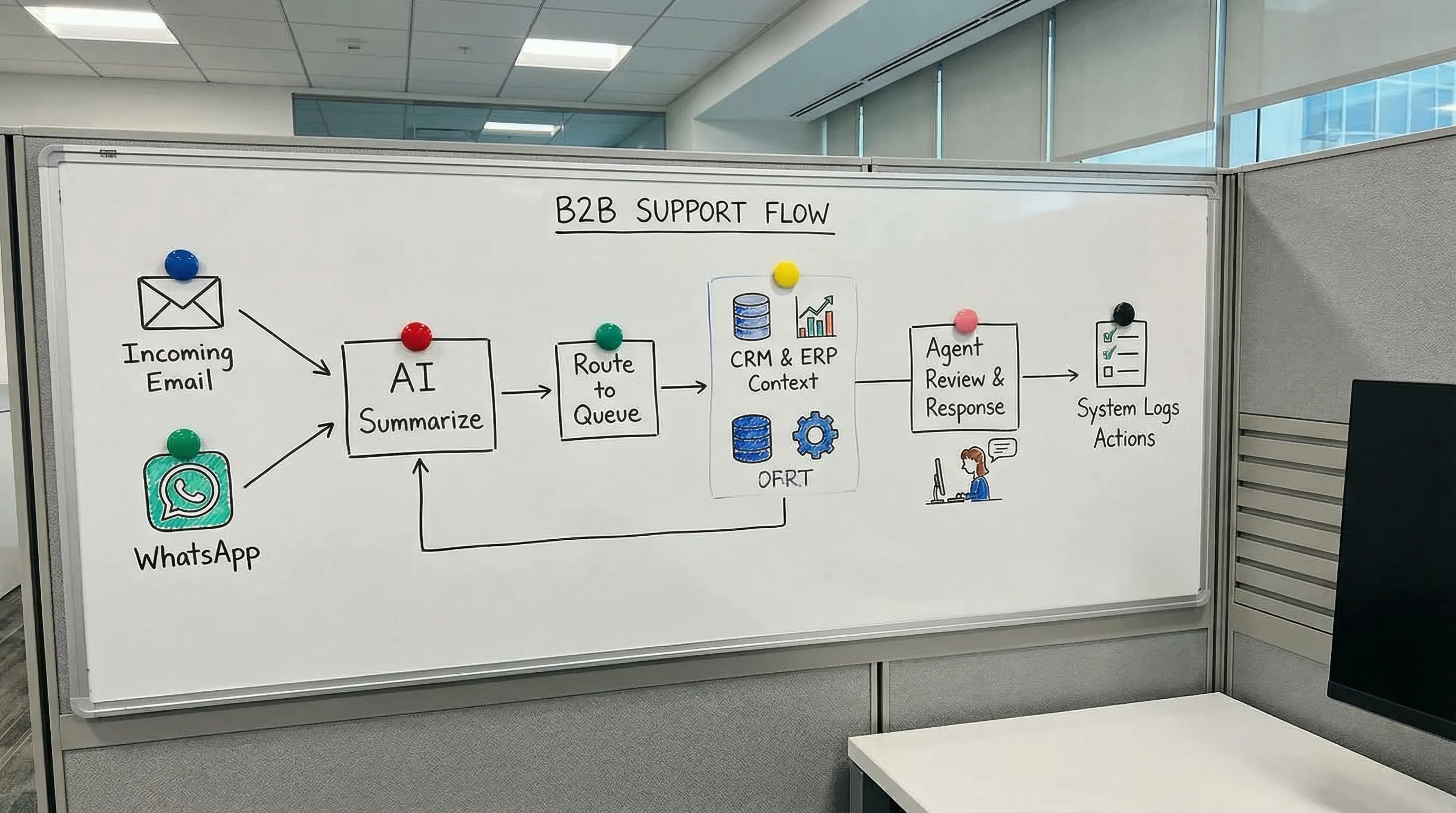
The good news is that customer service AI can cut response time fast, without a massive “replatforming” project. But only if you implement it as an operational system (intake, routing, context, draft, handoff, logging), not as a generic chatbot.
This guide focuses on the fastest, lowest-risk moves you can ship in 7–14 days.
What “response time” actually means in B2B support
Before you automate anything, align on which clock you’re trying to beat. In most B2B teams, three time metrics get mixed up:
First Response Time (FRT): How long it takes to send the first human-level reply.
Time to First Meaningful Response: The first reply that actually moves the issue forward (not just “we received your request”).
Time to Resolution (TTR): How long until the request is solved and closed.
If your goal is “cut response time fast,” focus on FRT and first meaningful response first. They are the easiest to improve quickly because they mostly depend on triage, context, and drafting speed.
Why response time is slow (and where AI helps immediately)
In growing SMEs, slow replies usually come from process friction, not lazy employees.
Common causes:
Requests arrive in too many places (email, WhatsApp, webform, calls, sales inboxes).
No structured intake, so agents must ask basic questions over multiple back-and-forth messages.
Manual triage and routing, the right person sees the request late.
Context switching across CRM, ERP, ticketing, and spreadsheets.
Knowledge is tribal, scattered, or outdated, so agents search or ask colleagues.
Approvals are slow (discounts, returns, service visits), so nobody replies until a decision exists.
Customer service AI helps fastest when you use it for:
Intake clarity: turn messy messages into structured tickets.
Triage and routing: classify urgency, topic, customer, and next step.
Drafting: generate grounded, on-brand replies from approved sources.
Read-only lookups: fetch order status, invoice info, contract terms, and past interactions.
Auto-logging: update CRM/ticket fields so nothing gets lost.
The fastest wins: 5 customer service AI patterns that cut response time
These are practical patterns that reduce FRT quickly, while keeping risk low.
1) AI intake that produces a clean ticket in seconds
If agents have to read a long email thread and reconstruct what’s going on, your response time will never be stable.
Use AI to automatically:
Summarize the request in 3–6 bullet points.
Extract key fields (customer name, location, product/SKU, order number, deadline, photos/attachments present).
Suggest the correct category and priority.
This alone can turn “I’ll reply later when I understand this” into “I can reply now.”
Practical prompt (copy/paste):
“Summarize this customer message for a support ticket. Output: issue summary, requested outcome, key entities (order number, SKU, site address), urgency signals, missing info to request, and a suggested next action.”
2) Triage and routing that prevents queue rot
Many teams measure response time per agent, but the real delay happens before ownership is clear.
Customer service AI can route based on:
Topic (billing, delivery, returns, technical, service scheduling)
Customer tier (strategic account vs small customer)
SLA risk (likely to breach)
Required permissions (credit note approval, contract exception)
Start with “assist mode”: AI suggests routing, a coordinator approves.
3) Agent-assist drafting (with strict grounding)
Drafting is where you get the biggest time back, especially for repetitive questions.
The key requirement in B2B is grounded answers. Your system should draft replies from:
Your approved knowledge base
Product sheets
Delivery and returns policies
Customer-specific terms (if available and allowed)
If you’re exploring chatbots too, read the deeper guide on what actually works in B2B: customer service chatbots with AI.
Practical prompt (copy/paste):
“Draft a reply in a professional B2B tone. Use only the provided policy excerpt and ticket details. If information is missing, ask up to 3 precise questions. Include a clear next step and expected timeline.”
4) “Read-only automations” that answer status questions instantly
The safest way to automate first responses is to start with read-only actions. No refunds, no credit notes, no master data changes.
High-impact examples:
Order status and delivery ETA
Invoice status (sent, paid, overdue)
Proof-of-delivery retrieval (where applicable)
Service appointment confirmation or rescheduling options
This requires integration with your systems of record. If your stack includes CRM/ERP complexity, follow these integration do’s and don’ts: AI integration with CRM and ERP.
5) “First meaningful response” templates that avoid dead-end acknowledgements
Auto-replies that only say “We received your request” improve metrics but not customer experience.
Instead, use AI to send a meaningful first response that:
Confirms understanding (summary)
Asks only what’s missing (few precise questions)
Provides the next step and a time expectation
Even when you cannot resolve instantly, you buy trust and reduce escalation pressure.
A 14-day implementation plan (built for speed, not perfection)
If your goal is response time reduction, you don’t need an enterprise rollout. You need one workflow in production.
Days 1–2: Baseline and scope
Pick one channel and one queue, for example “support@” or WhatsApp business.
Define:
The metric: FRT or first meaningful response
Operating hours and what counts as “responded”
The top 10 request types by volume
If you already have a helpdesk, pull a simple export. If you don’t, start with mailbox sampling.
Days 3–5: Build the AI intake and drafting loop
Design the minimum “response time loop”:
Trigger: new message arrives
AI output: summary, extracted fields, category, urgency, draft reply
Human step: agent edits and sends
Logging: ticket fields updated automatically
Keep it boring. Speed comes from reliability.
Days 6–9: Add context safely
Add the smallest useful context:
CRM: account owner, customer tier, open opportunities
ERP: order status or invoice status (read-only)
Knowledge base: policy snippets for the top issues
Make sure the AI is instructed to cite sources internally (for the agent), even if you don’t show citations to the customer.
Days 10–14: QA, guardrails, and go-live
Do a short QA cycle:
Test 30–50 real tickets
Flag hallucinations and missing context
Add fallback rules (if confidence is low, escalate)
Then roll out to one team, measure daily, and adjust.
For a more detailed “production readiness” mindset (monitoring, error prevention), see: AI checks for production monitoring.
Guardrails you should not skip (even when moving fast)
Cutting response time is not worth it if you create compliance or reputation risk.
Minimum guardrails for customer service AI:
Human-in-the-loop for anything that changes money, terms, or legal position.
PII controls: redact or minimize personal data where possible.
Least-privilege access: give AI only what it needs, ideally read-only to start.
Auditability: keep logs of inputs, outputs, and who approved what.
If you operate in the EU, align with GDPR expectations (official resource: EU GDPR portal) and keep an eye on obligations under the EU AI Act as it phases in.
For a practical control checklist, see: AI checklist for safe adoption.
Quick examples by sector (where response time usually gets stuck)
Wholesale and distribution
Response time often slows down because requests depend on ERP truth (inventory, delivery, substitutions).
Fast win: AI drafts responses that include order status, expected delivery windows, and next options, while logging the interaction back into your support/ticketing system.
Installation and field service companies
Delays come from scheduling and missing job details.
Fast win: AI intake extracts site address, photos, serial numbers, urgency signals, and suggests the right time window. Then your coordinator confirms.
Accounting and legal boutiques
Delays come from “should we answer this now or wait for a senior review?”
Fast win: AI drafts a response with a clear boundary (what you can confirm now, what requires review), plus a list of missing documents and a suggested timeline.
When to use an off-the-shelf tool vs custom AI workflows
You can cut response time with both approaches, the choice depends on integration needs.
Choose an off-the-shelf platform if your biggest issues are ticket volume, knowledge base answers, and agent drafting.
Choose custom workflows if your response requires pulling data from multiple systems (CRM + ERP + WMS) or if you need strict routing, approvals, and logging.
If you want a vendor shortlist and selection criteria, start here: AI tools for customer support.
Frequently Asked Questions
How fast can customer service AI reduce response time? If you focus on one queue and implement AI intake plus agent-assist drafting, many teams see measurable First Response Time improvements within 7–14 days.
Do we need a chatbot to cut response time? No. The fastest wins usually come from internal agent-assist and triage. Chatbots can help later, but only when knowledge and integrations are ready.
What is the safest place to start with customer service AI? Start with read-only workflows: summarization, categorization, drafting, and status lookups (order or invoice status) with human approval before sending.
How do we prevent AI from sending incorrect information to customers? Use grounded knowledge sources, add confidence thresholds and fallbacks, and keep humans in the loop for sensitive topics. Also log outputs and review errors weekly.
What should we measure besides response time? Track first meaningful response rate, escalation rate, reopening rate, and a quality metric (CSAT or internal QA score). Faster replies only matter if they stay correct.
Build a response-time engine with B2B GrowthMachine
If you want to cut response time fast, the key is turning customer service AI into a reliable workflow, connected to the systems you already use.
B2B GrowthMachine helps SMEs implement AI-driven sales and operations automation, including customer service intake, agent-assist, workflow automation, and integrations with CRM/ERP/email/WhatsApp, with continuous optimization.
Explore how we work at B2B GrowthMachine, or use this as your next step: pick one support workflow, define the response-time KPI, and ship a controlled pilot that your team will actually use.