
AI Questions to Ask Before You Buy Anything
Jan 15, 2026
Buying decisions feel simple until you see the real bill: onboarding time, integration work, change resistance, renewals, mistakes, and “quick fixes” that turn into permanent costs. In 2026, most B2B teams have access to AI, but far fewer use it as a disciplined buying copilot.
This guide gives you practical AI questions to ask before you buy anything (software, equipment, services, contractors, even a new hire). The goal is not “more information.” The goal is better decisions: fewer surprises, cleaner requirements, and a purchase that actually ships into your workflow.
How to use these AI questions (so they don’t mislead you)
AI is excellent at structuring messy thinking, generating options, and spotting missing considerations. It is not a source of truth by default. Use it like a sharp analyst who still needs sources and constraints.
Give AI the right context
Before you ask anything, paste a short briefing. Keep it specific.
What you’re buying and why
Your industry and process (wholesale distribution, accounting boutique, installation company, etc.)
Your constraints (budget, timeline, systems you must integrate with)
Your decision criteria (speed, compliance, margin impact, customer experience)
Add a “verification rule” to every prompt
When possible, tell AI exactly how to behave:
“If you’re unsure, say you’re unsure.”
“List assumptions explicitly.”
“Provide a short checklist of what I should verify with the vendor.”
Don’t paste sensitive data into generic chat tools
If you use a public AI assistant, avoid:
customer lists, pricing sheets, contracts, credentials, private financials
anything that could trigger GDPR or confidentiality issues
If you’re building an internal AI assistant for purchasing, finance, or legal work, do it with proper access controls, logging, and governance. (If you’re unsure what “safe” looks like, the NIST AI Risk Management Framework is a solid reference point, and EU rules are moving fast under the EU AI Act.
AI questions to clarify what you actually need (before you compare vendors)
Most bad purchases start with a fuzzy problem statement. These prompts force clarity.
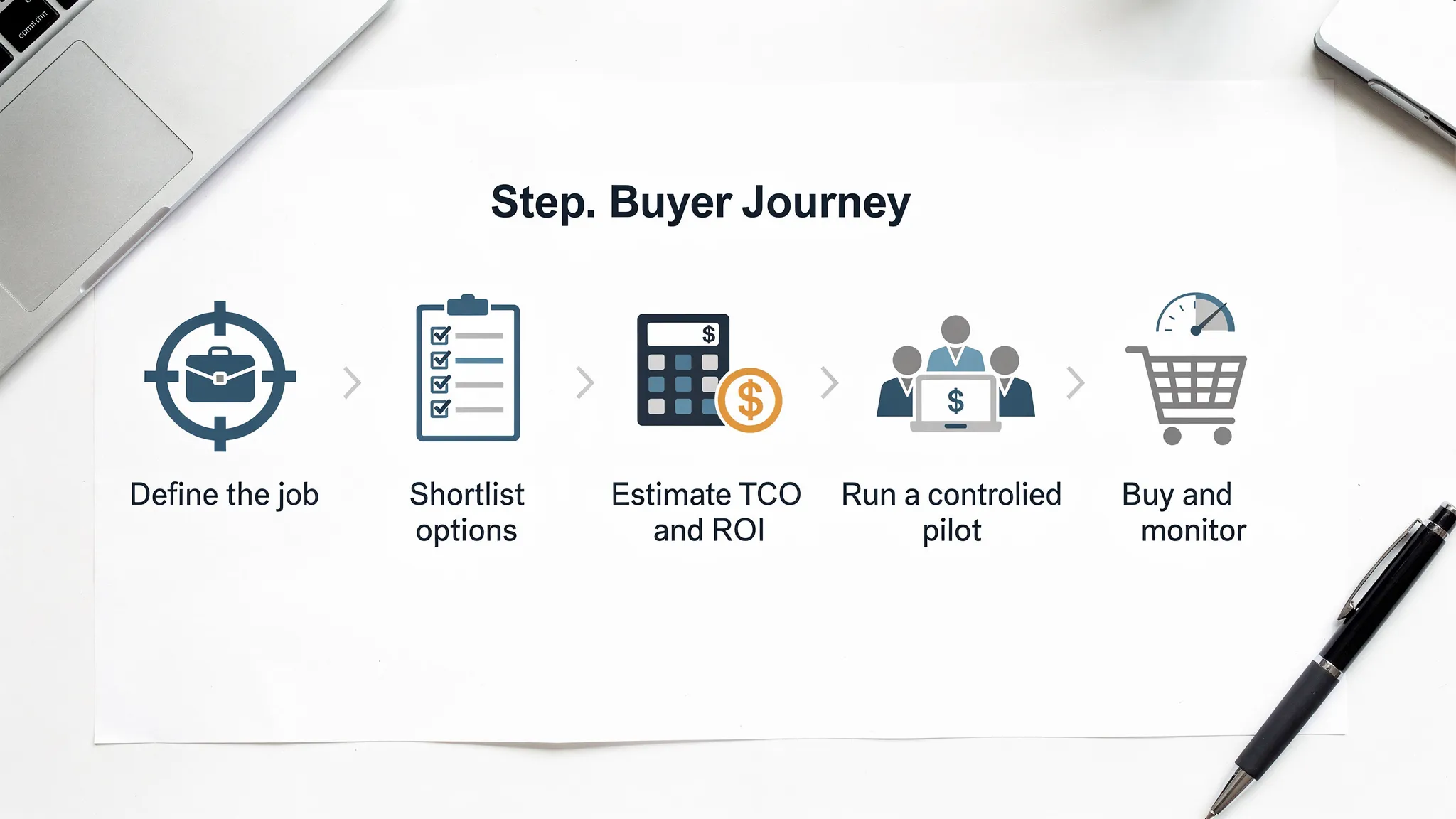
Define the job-to-be-done
Ask:
“What is the exact job I’m hiring this purchase to do, and what is not in scope?”
“Turn my problem into a one-sentence objective and 5 measurable acceptance criteria.”
“What would ‘success in 30 days’ look like for this purchase, and what would ‘success in 12 months’ look like?”
Identify the real bottleneck
Ask:
“Given this workflow, where is the delay actually created: intake, decision, handoff, follow-up, or rework?”
“What is the simplest change that would remove 20% of the friction without buying anything?”
This is especially useful for distributors, wholesalers, and installation companies where cycle time often dies in quoting, order status updates, and scheduling handoffs.
Write requirements that prevent scope creep
Ask:
“Create a requirements list split into Must-have, Nice-to-have, and Dealbreakers.”
“List the top 10 ways this project could creep in scope, and how to guardrail each.”
AI questions to compare options without drowning in features
Once you know what you need, AI can help you compare options in a structured way.
Build a shortlist that matches your reality
Ask:
“Given my constraints, what are 6 realistic solution approaches (including ‘do nothing’ and ‘use existing tools better’)?”
“What are the trade-offs between buying a specialized tool, using our current stack, and building a lightweight automation?”
If you’re buying software, always include your current tools in the analysis. A “new platform” often loses to “small automation on top of what we already have.”
Force a decision, not a list
Ask:
“If you had to pick only one option for a 30-day pilot, which one would you pick and why?”
“What is the strongest argument against the option you recommended?”
“What would have to be true for the second-best option to win instead?”
This helps prevent AI from giving you a safe, vague answer.
Detect vendor marketing language
Ask:
“Rewrite this vendor claim into testable statements and list how I can verify each one.”
“What questions should I ask to confirm this product actually does what the landing page implies?”
AI questions to estimate total cost of ownership (TCO) and ROI
Sticker price is rarely the real cost. Your cost is time, integration, errors, and adoption.
Make hidden costs explicit
Ask:
“List all cost categories beyond subscription fees: implementation, integrations, training, process changes, support, internal ownership, data work, ongoing optimization.”
“What are the most common ‘surprise costs’ for this category of purchase?”
Build a conservative ROI model
Ask:
“Create a conservative ROI estimate using three scenarios: low, expected, high.”
“What inputs drive ROI the most, and which inputs are easy to validate in a pilot?”
“If we only achieve 30% adoption, what happens to ROI?”
If you want a simple way to frame ROI for automation purchases, this B2B GrowthMachine guide on measurable metrics is useful: AI benefits and where ROI shows up first.
Translate ROI into operational KPIs
Ask:
“Which operational KPIs will move first if this works: cycle time, error rate, cost-to-serve, conversion rate, cash collection speed?”
“Write a one-page measurement plan for the pilot, including baseline and weekly check-ins.”
AI questions for risk, compliance, and “what could go wrong”
A purchase that increases risk can wipe out its ROI.
Data exposure and access risk
Ask:
“What data would this tool touch in our workflow, and what is the minimum access it needs?”
“What’s the safest architecture: read-only first, human approval for write actions, staged rollout?”
If your buying decision touches CRM or ERP data, also read: AI integration with CRM and ERP, do’s and don’ts.
Vendor lock-in and exit planning
Ask:
“What are the lock-in risks (data formats, automations, proprietary workflows), and how do we design an exit plan up front?”
“If we switch vendors in 18 months, what do we need to keep ownership of?”
Reliability and quality controls
Ask:
“Where could failures occur: wrong outputs, missing alerts, incorrect updates, hallucinated facts, unlogged decisions?”
“What monitoring and checks should exist before this touches customers or finances?”
If you’re deploying AI-driven workflows, production checks matter. See: AI checks for production monitoring that prevents errors.
AI questions to pressure-test implementation and adoption
Many purchases fail because they assume perfect usage from day one.
Make ownership and workflow fit explicit
Ask:
“Which role owns this after go-live, and what weekly tasks will they need to do?”
“List the workflow steps that will change for our team, and where resistance is likely.”
“What’s the minimum viable implementation that proves value without disrupting operations?”
Pilot design that actually de-risks the purchase
Ask:
“Design a 30-day pilot plan with clear go/no-go criteria and required integrations.”
“What should we run in ‘shadow mode’ first (observe and recommend), before we automate actions?”
If you want a structured way to evaluate readiness, use the B2B GrowthMachine self-test: Are you a 5-minute AI readiness test.
AI questions for negotiation and vendor due diligence
AI can help you negotiate without being adversarial. The key is to ask for clarity and proof.
Request proof in the right format
Ask:
“Draft an email asking the vendor for 3 customer references in my industry, and 2 examples of failed implementations.”
“Create a demo script that forces the vendor to show the exact workflow we will run, not generic features.”
Protect yourself contractually
Ask:
“What clauses typically matter for this purchase: SLAs, support response time, uptime, data processing terms, security commitments, export/backup, termination and migration support?”
“Write a checklist of questions to ask about data retention, access logging, and subprocessors.”
If you operate in the EU or serve EU customers, treat privacy and risk management seriously. For AI systems, regulatory expectations and enforcement are tightening.
AI questions tailored to common SME purchases (with examples)
Below are prompt patterns you can copy and paste, adapted to the types of companies B2B GrowthMachine works with.
If you’re a wholesaler or distributor buying quoting, forecasting, or inventory tooling
Ask:
“Given our goal (faster quotes, fewer stockouts, higher margin), what decisions should this tool improve weekly?”
“What data fields do we need from ERP, and what data quality issues usually break implementations?”
“Propose a pilot that improves one category or one customer segment first, including KPIs and rollback conditions.”
If you run an accounting or legal boutique buying AI or automation
Ask:
“Which tasks are safe to automate vs. require human approval, given professional liability risk?”
“What audit trail should exist for every AI-assisted output (who approved, what sources, what version)?”
“Draft an internal policy for staff use: what data is allowed, how to verify outputs, escalation rules.”
If you’re an installation company buying scheduling, dispatch, or service automation
Ask:
“Where do we lose time: inbound intake, triage, parts availability, scheduling, technician routing, customer updates?”
“Design a pilot that reduces reschedules and improves first-time-fix rate, without replacing our current planning tool.”
If you’re a B2B real estate broker buying lead, outreach, or pipeline tooling
Ask:
“What signals indicate intent for our ICP, and how should outreach change based on those signals?”
“Create a follow-up system that improves speed-to-lead and meeting booked rate, with guardrails to avoid spam.”
The “pre-mortem” AI question that saves the most money
If you ask only one thing before buying, ask this:
“Assume we buy this and it fails in 6 months. List the most likely reasons, the earliest warning signs, and the preventative controls we should put in place now.”
Then follow up with:
“Which of those risks can we test within 14 days?”
“What evidence would reduce uncertainty the most before signing a 12-month contract?”
That is how you turn AI from a brainstorming toy into a decision tool.
Frequently Asked Questions
Are these AI questions only for buying AI software? No. They work for almost any purchase because they target the same failure modes: unclear requirements, hidden costs, weak adoption, and unmanaged risk.
Can AI reliably compare vendors for me? AI can structure comparisons and highlight what to verify, but it can hallucinate details or rely on outdated information. Use it to generate a due diligence checklist, then confirm with vendors, documentation, and references.
What should I never paste into an AI chat when evaluating a purchase? Avoid sensitive customer data, contracts, credentials, pricing agreements, and internal financials unless you’re using an approved, controlled environment with proper security and data handling.
How do I turn these prompts into a real pilot plan? Ask AI to produce a one-page pilot spec: scope, success metrics, required integrations, human approval steps, go/no-go criteria, and a weekly QA routine. Then validate it with the people who own the workflow.
What’s a good go/no-go rule for SME purchases? A practical rule is: if you cannot define measurable acceptance criteria and a realistic owner for the workflow, you are not ready to buy yet. Run a smaller pilot first.
How do I prevent vendor lock-in? Ask for data export options, document how automations are built, keep your business rules outside proprietary black boxes when possible, and design an exit plan (migration steps and responsibilities) before signing.
Want help turning these questions into a working automation (not just a smarter spreadsheet)?
B2B GrowthMachine helps SMEs implement AI in a practical way: plug-and-play workflows, AI assistants, and custom AI automations that connect to your CRM, ERP, email, and other tools. If you want to evaluate a purchase, run a controlled pilot, or automate the workflow instead of adding another tool, start here: B2B GrowthMachine.