
AI and Customer Experience: Practical Wins in 30 Days
Jan 13, 2026
Most B2B teams don’t lose customers because they “don’t care.” They lose customers because the experience is slow, inconsistent, and hard to navigate, especially when quotes, delivery updates, returns, and service questions pile up.
That is exactly where AI and customer experience connect in a practical way. You do not need a full replatforming project to see results. In 30 days, you can ship two or three focused automations that reduce response times, prevent errors, and give customers the feeling that your business runs on rails.
What “customer experience” means in B2B (and why AI helps fast)
In B2B, customers rarely ask for “delight.” They ask for certainty.
Can I get a quote quickly and accurately?
Where is my order and what changed?
Who owns my issue and when will it be resolved?
Can you answer using my contract terms, prices, and agreed SLAs?
AI improves CX fastest when it is used to remove friction in operational workflows, not when it is used to write nicer sentences.
A useful way to think about it: customers experience your internal process. If your internal process is email chaos plus tribal knowledge, no amount of friendly wording will fix it.
Industry research consistently shows speed and consistency matter. For example, Salesforce’s State of the Connected Customer reports that a large majority of customers say the experience a company provides is as important as its products or services. (Source: Salesforce research)
The 30-day target: what “wins” look like
A realistic 30-day goal is not “AI everywhere.” It is:
Faster first response on inbound questions (even when humans still approve replies)
Fewer back-and-forth messages because intake is structured
Faster quoting for standard requests (with guardrails)
More consistent answers because the team uses the same knowledge and policies
Pick outcomes you can measure daily. In most SMEs, the quickest CX lift comes from a handful of operational metrics:
First response time (how fast customers get a meaningful first reply)
Time to quote (request received to quote sent)
First contact resolution rate (how often you solve it without reopening)
Handoff quality (how often sales or service has to rework the same ticket)
Self-service containment (how often customers get the answer without human effort)
You do not need perfect measurement to start. You do need a baseline.
Day 1 to Day 3: choose one “CX moment” you will fix
If you try to improve everything at once, you ship nothing. In B2B, the best first targets are moments where customers feel delay immediately.
Good 30-day candidates:
Quote requests: “Can you quote this BOM/specification by Friday?”
Order and delivery status: “Where is order 104923 and what is the new ETA?”
Returns/RMA: “Is this eligible, what is the process, what documents do you need?”
Service scheduling: “Can you plan an installation visit, what slots are available?”
Document-heavy questions: “What does the contract say about X, can you confirm?”
Match the use case to your sector:
Wholesale/distribution: order status, delivery exceptions, returns, product availability, quote turnaround
Installation companies: scheduling, pre-visit checklists, troubleshooting intake, warranty eligibility
Accountancy/legal boutiques: onboarding checklists, document requests, status updates, standard advisory Q&A
B2B real estate brokers: lead qualification, viewing coordination, document packs, due diligence Q&A
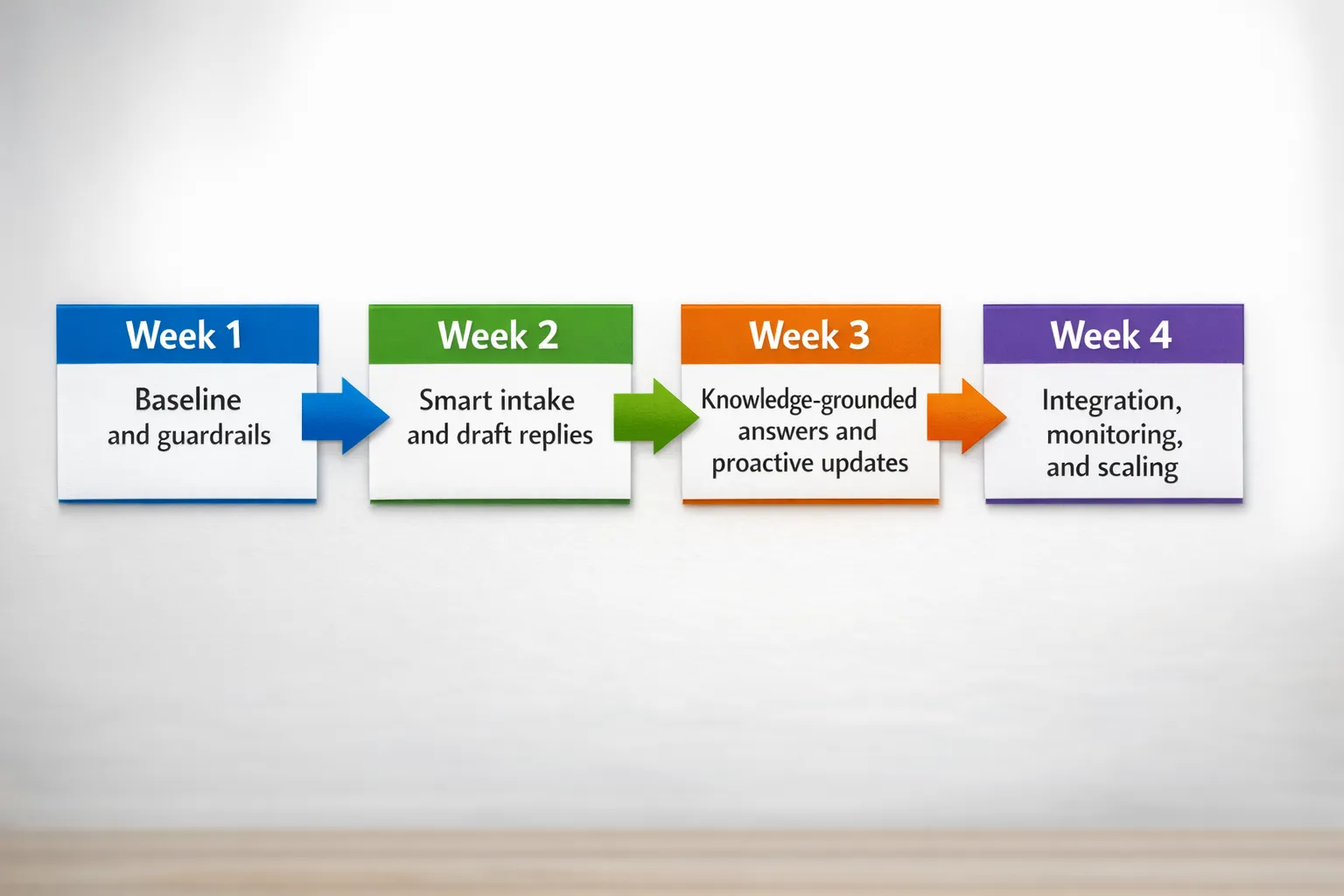
Day 4 to Day 7: baseline, knowledge, and guardrails (the part most teams skip)
This week is what makes AI reliable.
Baseline in one hour
Pull a small sample (for example, the last 50 inbound emails or tickets for the chosen CX moment) and capture:
Average first response time
Common request types (3 to 7 categories is enough)
The top 10 “missing pieces of info” that cause back-and-forth
Where the correct answer lives today (ERP screen, PDF, shared mailbox, someone’s head)
Create a “minimum knowledge pack”
Do not build a perfect knowledge base. Build the minimum set that lets AI respond consistently.
Examples of what to include:
Pricing and quoting rules (what you can and cannot promise)
SLAs and service policies
Return policy, warranty terms, required documents
Product or service eligibility rules
Escalation rules (when a human must take over)
If you want AI to answer from internal knowledge, the safest pattern is retrieval with source grounding (often called RAG). If you are planning CRM/ERP integration, use a design that keeps access controlled and auditable. This guide on integration pitfalls is a useful reference: AI integration with CRM and ERP: do’s and don’ts.
Define guardrails early
Your first workflows should be designed so you can trust them:
Human approval for outgoing messages (at least in week 2)
No autonomous changes to master data (prices, customer records) in the first sprint
Clear escalation triggers (missing critical info, unhappy tone, legal/compliance keywords)
Logging of inputs, outputs, and final action
If you operate in the EU, keep GDPR and the EU AI Act on your radar. In practice for an SME pilot, the key behaviors are data minimization, access control, traceability, and documented purpose. If you want a structured risk view, start with an AI quality and risk assessment approach like the one described here: AI check: how to assess quality and risk.
Week 2: ship “smart intake + drafted response” (your fastest CX win)
This is the quickest automation that customers feel immediately because it reduces waiting time and improves clarity.
What you build
A workflow that:
Captures inbound requests from email, web form, chat, or WhatsApp
Classifies the request into a small set of categories
Checks if key information is missing
Drafts a reply using your policy and knowledge pack
Creates or updates a ticket/CRM record
Routes to the right queue or owner
You are not trying to replace your service team. You are trying to remove the repetitive reading, sorting, and drafting.
Example “intake completeness” fields
Keep it simple. For a quote request, you often need:
Customer name and company
Delivery location
Product identifiers or BOM
Quantity
Required delivery date
Special terms (contract pricing, framework agreement)
If one of these is missing, the AI should not guess. It should ask a single focused question.
A prompt template that works in real operations
Use a prompt that forces clarity and prevents overreach:
System guidance (example):
“Draft a B2B customer reply. Use only the provided policy and customer context. If information is missing, ask up to 2 clarifying questions. If the request requires human approval (pricing exception, legal term change, complaint escalation), label it ‘HUMAN REQUIRED’ and stop. Keep the response under 120 words. Tone: helpful, direct.”
This kind of structure is more important than the model you pick.
Where this shows up as a business win
Wholesaler: faster delivery updates, fewer calls to sales reps
Installer: fewer wasted dispatches because intake captures site constraints
Accountancy: fewer back-and-forth emails before you can start the work
If you want to see what this looks like when expanded into production-grade CX workflows (chatbots, handoff, orchestration), this deep dive is useful: Customer service chatbot AI: what works in B2B.
Week 3: add knowledge-grounded answers and one proactive update flow
Week 3 is where AI stops being “drafting help” and starts being “experience improvement.”
Upgrade 1: knowledge-grounded answers for repetitive questions
Common B2B examples:
“What is your return process for opened packaging?”
“What documents do you need for warranty?”
“Can you confirm the SLA response window?”
If you connect AI to a controlled knowledge source, your team answers consistently and new hires ramp faster.
Keep the scope tight. Add 20 to 40 high-frequency Q&A items with sources (policy docs, helpdesk macros, approved templates). Expand only after you see stable performance.
Upgrade 2: proactive updates for one predictable event
Proactive beats reactive for customer experience. Start with a single event that currently causes inbound noise.
Examples:
Order delay detected, send an ETA update and next step
Installation rescheduled, send confirmation and what the customer should prepare
Missing document in onboarding, send a reminder with a clear checklist
The key is to base the trigger on a real system signal (CRM stage change, ERP delivery date change, ticket status) instead of “AI intuition.”
Week 4: harden, integrate, and make it measurable
Week 4 is about making sure your 30-day win does not break in month two.
Add monitoring that a non-technical manager can use
You want a simple daily view of:
How many requests were handled through the workflow
How many drafts were approved vs edited heavily
Top reasons for escalation
Any “unsafe” events (PII exposure risk, hallucination flags, policy conflicts)
Build the feedback loop
Your team corrects drafts every day. Capture those corrections.
If the AI often misses the same field, update the intake form
If it confuses two product lines, add a clearer knowledge entry
If it uses the wrong tone for complaints, tighten the rules
This is where continuous optimization becomes real operations, not a buzzword.
If you want a practical framework for these workflow patterns (trigger, context, decision, action, human check), this is a strong reference point: AI workflows that save hours.
Common failure modes (and how to avoid them)
Most “AI CX” projects fail for operational reasons, not model reasons.
Failure mode: automating the wrong thing
If you automate “writing,” you get nicer emails. If you automate routing, completeness checks, and next steps, you get faster outcomes.
Failure mode: missing ownership
Name an owner for the workflow. Not IT, not “the team.” One person who owns the baseline, the measurement, and the weekly improvements.
Failure mode: letting AI guess
In customer-facing work, guessing is expensive. Guardrails and fallbacks are part of the product.
Failure mode: no integration plan
If the AI cannot read status, prices, entitlements, or ticket history, it will frustrate customers. Even a lightweight integration (read-only at first) changes the experience dramatically.
Where B2B GrowthMachine fits (if you want this in production fast)
If you want practical wins in 30 days, the real challenge is usually not “access to AI.” It’s orchestration across your email, helpdesk, CRM, ERP, and messaging tools, plus the guardrails to keep quality high.
B2B GrowthMachine helps SMEs implement plug-and-play AI workflows and agents for sales and operations, including integrations, human-in-the-loop controls, and ongoing optimization. If you want to turn one customer experience moment (quotes, order updates, onboarding, service scheduling) into a measurable, automated workflow, start here: B2B GrowthMachine.